

How Expense Categories Work in Odoo 19
If you are handling employee expenses in your business, you already know how confusing things can get. Receipts get lost, approvals get delayed, and at the end of the month, matching everything with accounts becomes stressful. That is why understanding how expense categories work in Odoo 19 is important.
When you start using the Odoo 19 ERP expenses app, you will notice that everything depends on how well your Odoo 19 expense categories are defined. These categories are not just labels. They decide how expenses are recorded, approved, and reimbursed.
In this blog, I will guide you step by step so you can clearly understand how expense categories work in Odoo 19, how to manage Odoo 19 ERP expense categories, and how they help you control your business expenses without confusion.
What Are Odoo 19 Expense Categories in Expenses App
Odoo 19 ERP expense categories are used to organize different types of expenses submitted by employees. When someone submits an expense in the Odoo 19 ERP expenses app, they don’t just enter an amount. They select a category. This category tells the system what kind of expense it is.
For example, you can create categories like travel, meals, fuel, or office supplies. Each category has its own rules and accounting setup. This is how the system stays organized and your financial records remain clear.
Why Odoo 19 Employee Expense Categories Matter for Your Business
If categories are not properly defined, everything becomes difficult to manage. That is why Odoo 19 ERP employee expense categories play a very important role.
When categories are set properly, your team knows exactly where to place each expense. Managers can review requests faster because everything is already organized. Your accounts team does not need to fix errors later.
Also, with proper Odoo 19 ERP reimbursement categories, employees clearly understand which expenses will be reimbursed and how. This removes confusion and builds trust within the team.
How Odoo Expense Categories Setup Works in Odoo 19
Let me walk you through how Odoo expense categories setup actually works. When you open the Odoo 19 Expenses app.
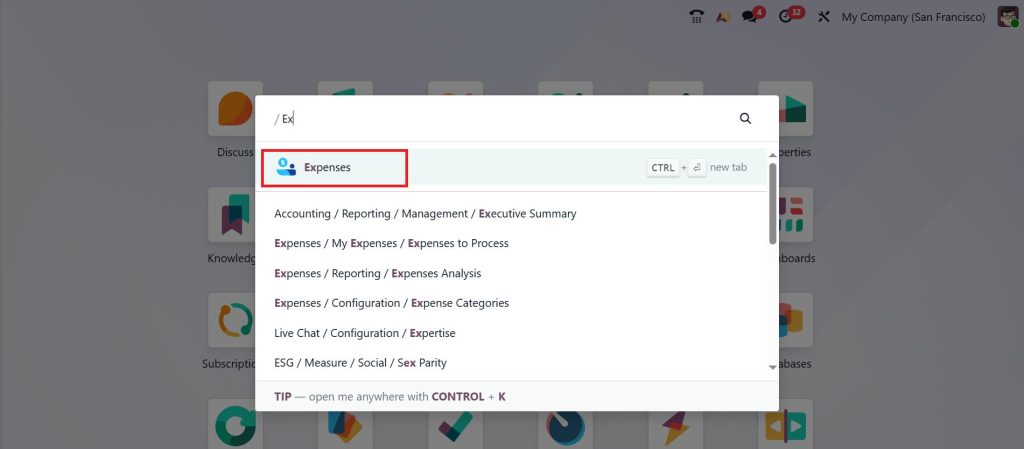
Go to Configuration, and you will find an option for Expense categories.
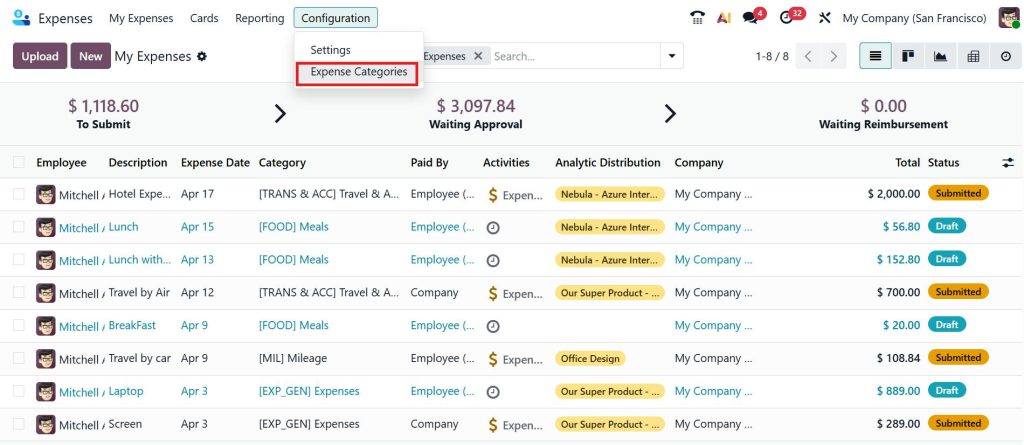
Click New.
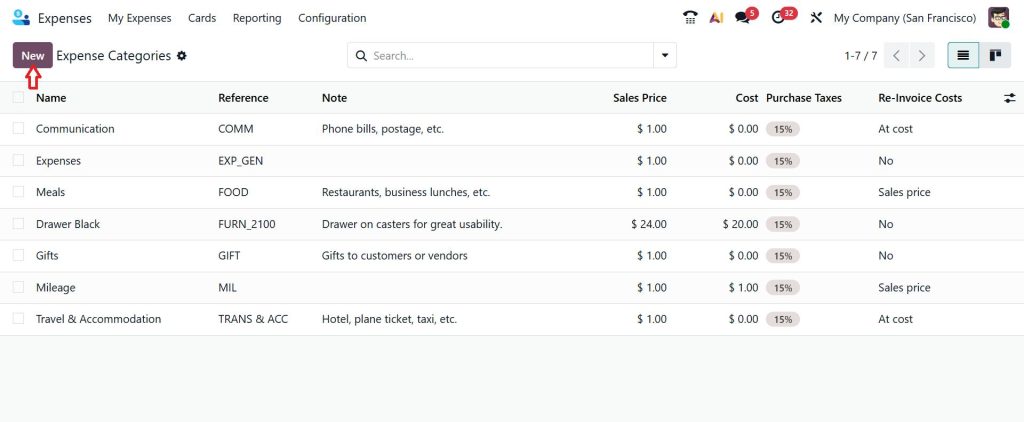
While creating a category, you define:
- Name of the category
- Type of expense
- Cost
- Linked account
- Taxes (if applicable)
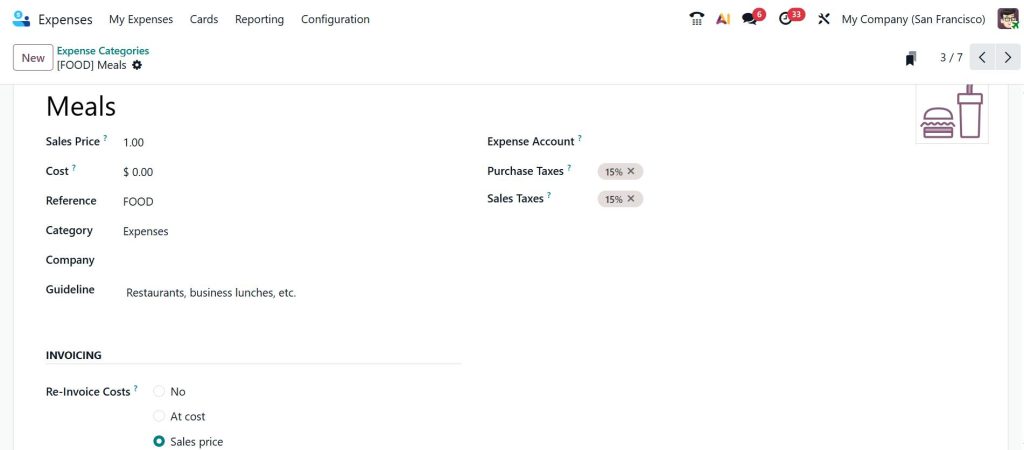
For example, if you create a travel category, you can define all rules related to travel expenses. This setup decides how the system will behave when someone selects that category.
Understanding Odoo 19 Expense Category Configuration in Detail
The real structure comes from the Odoo 19 expense category configuration. Here, you define how each category should behave. You can set:
- Whether the expense is paid by the company or the employee
- If a receipt is required
- Limits on spending
- Default taxes
- Billing options
For example, in an Odoo 19 meal expense category, you may set a daily limit and require receipts. This helps you control unnecessary spending. Each configuration directly affects how smoothly your expense process runs.
How Odoo 19 Expense Account Mapping Keeps Your Accounts Accurate
One important part of how expense categories work in Odoo 19 is Odoo 19 expense account mapping. Every category is connected to a specific accounting account. When an expense is approved, it is automatically recorded in that account.
For example:
- Travel category → Travel expense account
- Meals category → Food expense account
Because of this mapping, your accounts remain accurate without manual effort. Your finance team does not need to adjust entries later.
How Odoo 19 Travel Expense Category Works in Real Scenarios
Let’s take a closer look at the Odoo 19 travel expense category. When an employee travels for work, they may spend on flights, hotels, or transport. Instead of adding these expenses randomly, they select the travel category.
Once selected, the system:
- Applies the correct account
- Checks reimbursement rules
- Sends it for approval
This makes the entire process simple and clear for both employees and managers.
How Odoo 19 Meal Expense Category Helps Control Daily Spending
Now consider the Odoo 19 meal expense category. Meal expenses usually need more control. You may want to limit how much can be spent in a day or require receipts for every claim.
By setting these rules in the category, you don’t need to monitor every expense manually. The system already knows what is allowed and what is not. This reduces unnecessary costs and keeps everything under control.
Role of Odoo 19 Reimbursement Categories in Expense Management
Another important part is Odoo 19 ERP reimbursement categories. These categories decide how employees get their money back. Some expenses are paid directly by the company, while others are paid by employees and later reimbursed.
When reimbursement rules are clearly defined:
- Employees know what to expect
- Finance teams process payments faster
- There is no confusion about approvals
This keeps the entire process smooth and reliable.
How Odoo 19 Expenses App Simplifies Employee Expense Submission
Once everything is set up, using the Odoo 19 ERP expenses app becomes very easy for employees. They just need to:
- Enter the expense amount
- Upload the receipt
- Select the correct category
The rest is handled by the system. Based on the selected category, all rules, accounts, and approvals are automatically applied. This reduces errors and saves time for everyone involved.
Common Mistakes in Odoo 19 Expense Categories Setup
Even though the system is simple, some common mistakes can create issues. One mistake is creating too many categories. This confuses employees and slows down the process. Another issue is incorrect Odoo 19 expense account mapping, which leads to wrong financial records.
Sometimes businesses also forget to define proper Odoo 19 ERP reimbursement categories, which causes delays in payments. Avoiding these mistakes will help you get better results from the system.
How Odoo 19 Employee Expense Categories Improve Decision Making
When your Odoo 19 employee expense categories are properly set, you get clear insights into your business spending. You can easily see:
- How much is spent on travel
- How much goes into meals
- Which department spends more
This helps you make better financial decisions and control your budget more effectively.
Take Control of Your Expenses with Smart Odoo 19 Category Setup
Once you clearly understand how expense categories work in Odoo 19, you start seeing where things usually go wrong and how easily they can be fixed. The Odoo 19 ERP expenses app works efficiently only when your Odoo 19 ERP expense categories are properly defined, your Odoo 19 expense category configuration is clear, and your Odoo 19 expense account mapping is accurate.
When your categories are structured the right way, your team spends less time fixing errors and more time focusing on actual work. Approvals become quicker, reimbursements stay consistent, and your financial records remain clean without extra effort.
If your current setup still feels confusing or unorganized, it means there is room for improvement.
If you’re planning to implement or optimize your Odoo 19 ERP expenses app, Netilligence can help you set up smart expense categories personalised to your business needs. Let’s simplify your expense management with us today.




