

If you are working on Odoo or planning to upgrade, you might already feel that managing everything manually is getting harder day by day. Messages are coming in, tasks are pending, follow-ups are delayed, and you keep thinking, “There should be an easier way to handle all this.” This is where AI agents in Odoo 19 start to make sense.
AI agents in Odoo 19 are like smart helpers inside your system. They don’t just follow fixed steps; they understand what is happening and respond accordingly. This means instead of you checking everything again and again, the system starts handling things for you.
With Odoo 19 AI agents, your daily workload starts to feel lighter because the system can read messages, understand data, and take actions. If you are wondering how AI agents work in Odoo 19, just think of it as giving your system the ability to think a little before acting.
The Odoo 19 ERP AI module is where all of this is managed. It connects different features like Odoo 19 AI automation features, Odoo 19 ERP ChatGPT integration, and Odoo 19 Gemini integration, so your system can handle real work instead of just storing data.
What Are AI Agents in Odoo 19?
When we talk about AI agents in Odoo 19, we are not talking about something complicated. These are systems that can read inputs, understand what they mean, and take action without waiting for you every time. This is very different from traditional automation, where everything works on fixed rules.
For example, if a customer sends a message asking about an order, a normal system may just store that message. But Odoo 19 ERP AI agents can read it, understand the request, check the order status, and send a reply. This is how things start moving faster without extra effort from your side.
How AI Agents Work in Odoo 19?
To understand how AI agents work in Odoo 19, let’s break it down in a simple flow that you can relate to.
First, the system receives some input. This can be a message, an email, a form entry, or even a change in your data. Then the Odoo 19 ERP AI module processes that input. It tries to understand what is being asked or what action is needed.
This is where Odoo 19 ERP ChatGPT integration and Odoo 19 Gemini integration play their role. They help the system understand human language and context. So instead of just reading words, the system actually understands intent.
After that, the AI agent decides what to do next. This decision is based on conditions, past data, and the setup you have done. Once the decision is clear, the system acts. This could be sending a message, updating a record, assigning a task, or triggering a process.
All of this happens through AI server actions in Odoo 19, which connect the thinking part with the action part.
Odoo 19 AI Module
The Odoo 19 ERP AI module is the place where all AI-related activities are controlled. If you are planning to use AI in your system, this is where you will spend most of your time.
It allows you to connect AI tools, define behaviours, and manage how your system responds to different situations. Without this module, Odoo 19 ERPAI agents cannot function properly because they need a central system to process data and trigger actions.
Odoo 19 AI Automation Features
1. Smart Automation
One of the biggest advantages of Odoo 19 AI automation features is reducing manual work. Instead of doing repetitive tasks, AI agents handle them automatically.
2. Natural Language Understanding
With Odoo 19 ERP ChatGPT integration and Odoo 19 Gemini integration, AI agents can:
- Understand human language
- Respond naturally
- Handle complex queries
3. Real-Time Decision Making
AI agents don’t wait for instructions. They:
- Analyze data instantly
- Take immediate actions
- Improve response time
4. Workflow Automation
Using Odoo 19 AI workflow automation, businesses can automate complete processes like:
- Lead management
- Order processing
- Customer support.
Odoo 19 ChatGPT Integration
With Odoo 19 ERP ChatGPT integration, your system becomes better at understanding and responding to messages. Whether it’s customer queries, internal communication, or email replies, the system can generate responses that feel natural and relevant.
This helps reduce delays and keeps communication active without you needing to type every reply.
Odoo 19 Gemini Integration
The Odoo 19 Gemini integration adds another layer of understanding. It helps in handling more complex situations where deeper analysis is required. This means your system can not only respond but also evaluate and act based on different conditions.
Together, both integrations improve how AI agents in Odoo 19 perform in real scenarios.
AI Server Actions in Odoo 19
When an AI agent decides to take action, it uses server actions to execute that decision. For example, if a payment is delayed, the system can automatically send a reminder. If a lead is qualified, it can be assigned to a salesperson.
This connection between decision and execution is what makes AI useful in real business processes.
Odoo 19 AI Workflow Automation
With Odoo 19 AI workflow automation, you can connect multiple steps into one smooth flow. Instead of handling tasks one by one, the system takes care of the entire process.
For example, when a new lead enters your system, the AI agent can check details, assign it, send a welcome message, and schedule a follow-up. All of this happens without you opening each record again and again. This is where Odoo 19 ERP AI agents start saving real time in daily work.
How to Configure AI Agent in Odoo 19?
If you are thinking about how to configure an AI agent in Odoo 19, you don’t need to worry. The process is simple if you take it step by step.
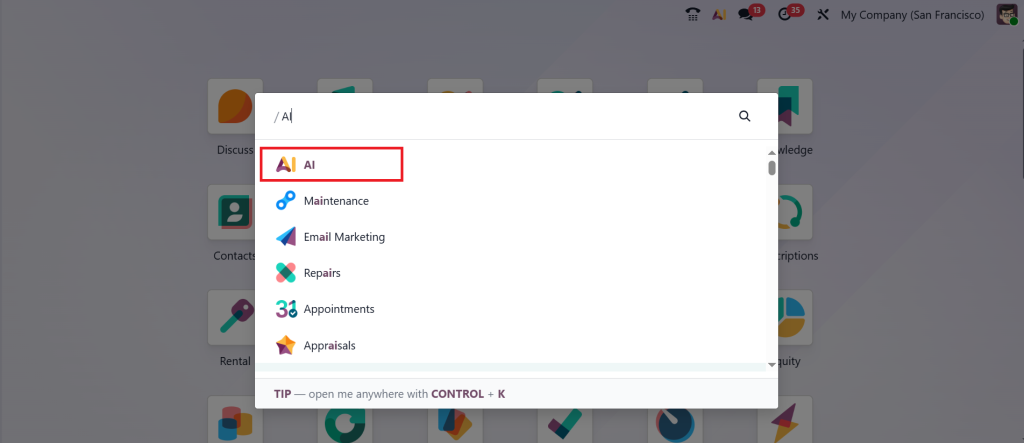
Step 1 – Enable AI Module
Start by activating the Odoo 19 ERP AI module.
Step 2 – Define Use Case
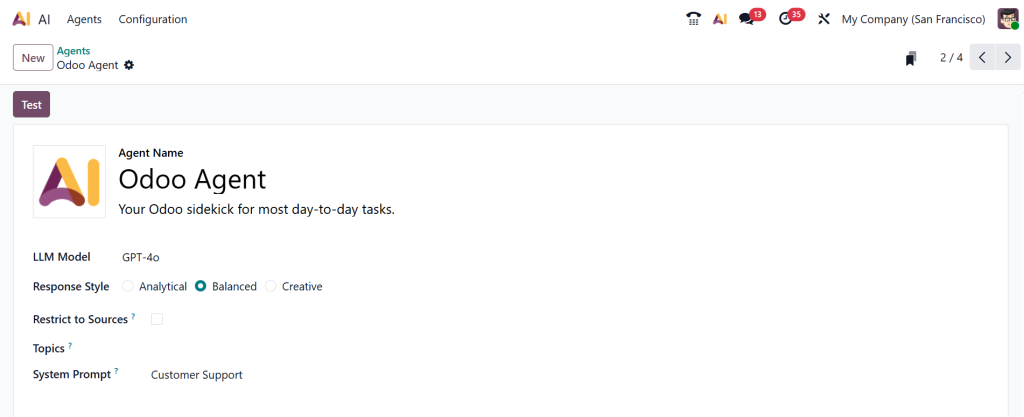
Decide what you want the AI agent to do:
- Customer support
- Sales automation
- Data processing
Step 3 – Set Triggers
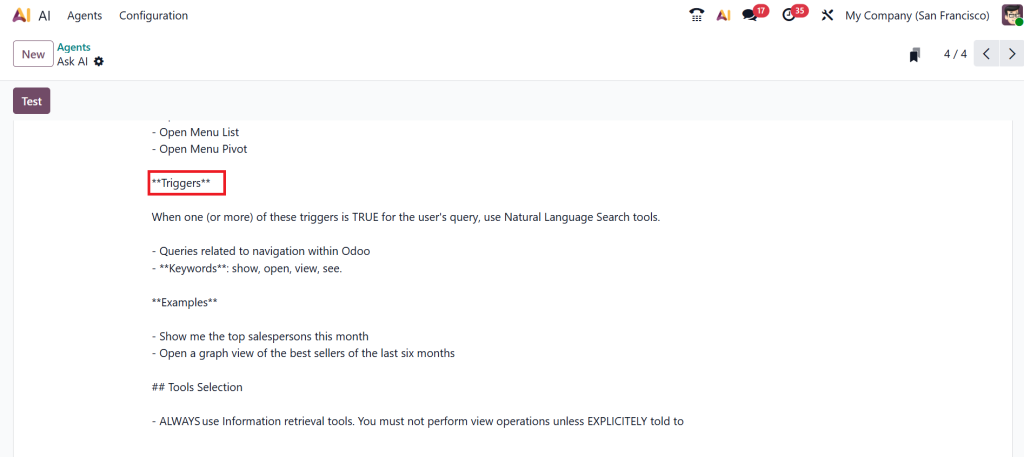
Define when the AI agent should act:
- On message received
- On record update
- On specific conditions
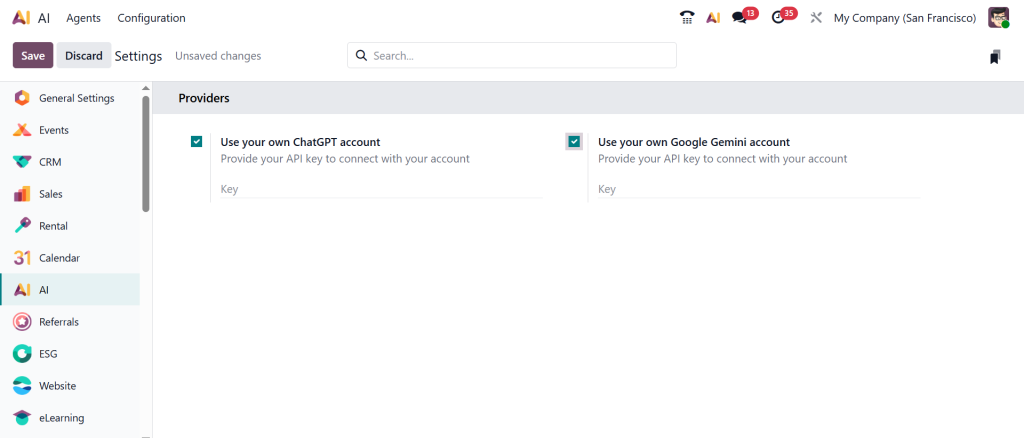
Step 4 – Connect AI Integration
Integrate:
- Odoo 19 ERP ChatGPT integration
- Odoo 19 ERP Gemini integration
Step 5 – Configure Actions
Use AI server actions in Odoo 19 to define what happens next.
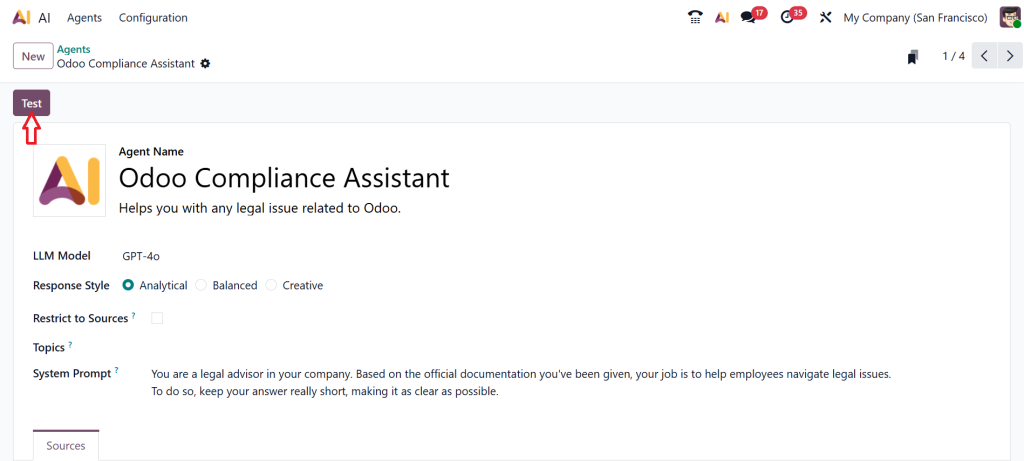
Step 6 – Test & Optimize
Always test your AI agent before full deployment.
Why Businesses Are Moving Towards Odoo 19 AI Agents?
If you look around, many businesses are already moving towards Odoo 19 ERP AI agents. The reason is simple. Workload is increasing, and manual handling is slowing things down.
People don’t want to spend hours replying to messages or checking updates. They want systems that can handle routine work while they focus on important decisions. This is exactly what AI agents in Odoo 19 are helping with.
Start Using AI Agents in Odoo 19 the Right Way with Netilligence
If your team is still handling messages manually, missing follow-ups, or spending too much time on repetitive tasks, it’s a clear sign that your system is not being used to its full potential. Understanding AI agents in Odoo 19 is one thing, but setting them up correctly inside your system is where most businesses get stuck.
At Netilligence, we help you implement Odoo 19 ERP AI agents in a way that actually supports your daily operations. From setting up the Odoo 19 ERP AI module to configuring Odoo 19 ERP ChatGPT integration, Odoo 19 ERP Gemini integration, and building proper Odoo 19 AI workflow automation, we focus on what works for your business in real scenarios.
Whether it’s defining smart triggers, setting up AI server actions in Odoo 19, or helping you configure an AI agent in Odoo 19 step by step, our goal is simple: to make your system handle more work so your team doesn’t have to.
If you want your Odoo system to stop slowing you down and start supporting your work, this is the right time to fix your setup.
Reach out to Netilligence and let’s build your Odoo AI system the right way.




