

How to Configure Cycle Counts in Odoo 19 for Better Inventory Accuracy
Managing inventory accurately is one of the biggest challenges for businesses that handle products across warehouses, retail stores, manufacturing units, or distribution centers. Even small inventory discrepancies can lead to delayed deliveries, stock shortages, excess inventory, and dissatisfied customers.
This is where how to configure cycle counts in Odoo 19 becomes an important topic for inventory managers and business owners. Instead of shutting down operations for a complete physical inventory count, businesses can use Odoo 19 cycle counts to verify stock regularly and maintain inventory accuracy throughout the year.
Understanding how to configure cycle counts in Odoo 19 helps organizations perform scheduled stock verification without disrupting daily warehouse activities. Through Odoo 19 inventory cycle count processes, businesses can identify stock mismatches early and take corrective actions before they affect operations.
The Odoo cycle count setup feature allows companies to define counting frequencies for different storage locations. High-value products can be counted more frequently, while slower-moving items can follow a less frequent schedule. This makes cycle counting in Odoo practical and efficient.
With Odoo inventory adjustments, warehouse teams can quickly reconcile physical stock with system records. Businesses using Odoo 19 stock count functionality gain better inventory visibility, reduced stock discrepancies, and improved operational control.
The inventory cycle count Odoo 19 process is especially useful for companies that manage thousands of products across multiple locations. Using Odoo 19 location inventory frequency, organizations can create a structured counting strategy that improves inventory accuracy while reducing workload.
In this guide, we will explain how to configure cycle counts in Odoo 19, how the feature works, its benefits, setup process, best practices, and how businesses can optimize inventory management using Odoo 19.
What Are Cycle Counts in Odoo 19?
Cycle counting is an inventory control method where selected products or storage locations are counted regularly according to a schedule rather than conducting a complete physical inventory all at once.
Instead of counting every item in the warehouse annually, businesses perform smaller counts continuously.
For example:
- Fast-moving products may be counted weekly
- Medium-demand items may be counted monthly
- Slow-moving inventory may be counted quarterly
- High-value products may be counted daily
The goal of Odoo 19 cycle counts is to maintain inventory accuracy without interrupting business operations.
Benefits of Cycle Counting
- Improves inventory accuracy
- Reduces stock discrepancies
- Minimizes warehouse disruptions
- Identifies inventory issues quickly
- Enhances customer satisfaction
- Supports better inventory planning
- Reduces operational risks
Why Businesses Should Use Odoo 19 Inventory Cycle Count
Inventory errors can happen due to:
- Receiving mistakes
- Picking errors
- Damaged goods
- Theft or shrinkage
- Incorrect stock transfers
- Data entry mistakes
Without regular verification, these discrepancies continue growing over time.
The Odoo 19 inventory cycle count process helps businesses detect and correct these issues before they become serious problems.
Business Advantages
Better Inventory Accuracy
Frequent stock verification ensures that system quantities match physical quantities.
Improved Warehouse Performance
Warehouse staff can trust inventory data when processing orders.
Reduced Stockouts
Accurate inventory records prevent unexpected shortages.
Better Purchasing Decisions
Reliable stock information improves procurement planning.
Increased Customer Satisfaction
Correct inventory levels result in timely deliveries and fewer order issues.
Understanding Odoo 19 Location Inventory Frequency
One of the most powerful features in cycle counting is the ability to define counting schedules based on warehouse locations.
What Is Location Inventory Frequency?
The Odoo 19 location inventory frequency feature allows businesses to specify how often a storage location should be counted.
For example:
Location | Frequency |
Receiving Area | Weekly |
Fast Moving Products | Monthly |
High Value Storage | Weekly |
Spare Parts Storage | Quarterly |
Slow Moving Inventory | Semi-Annually |
This structured approach makes inventory management more organized and efficient.
Why It Matters
Different inventory areas require different levels of attention.
A warehouse containing expensive electronic components should be counted more frequently than a storage area containing low-value packaging materials.
By using Odoo 19 location inventory frequency, businesses can allocate counting resources effectively.
How to Configure Cycle Counts in Odoo 19
Now let’s look at the complete process of how to configure cycle counts in Odoo 19.
Step 1: Enable Inventory Management Features
First, access the Inventory application.
Navigate to:
Inventory → Configuration → Settings
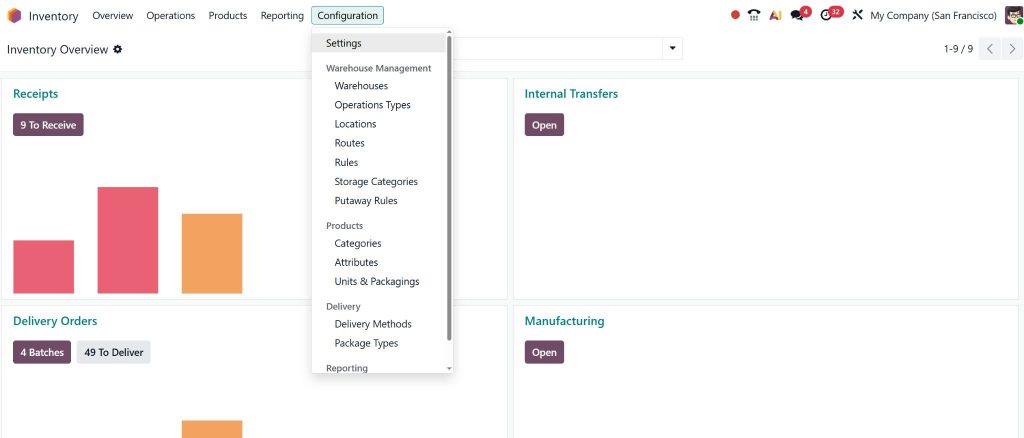
Review available inventory settings and ensure necessary inventory tracking options are activated.
Save your changes.
Step 2: Open Storage Locations
Navigate to:
Inventory → Configuration → Locations
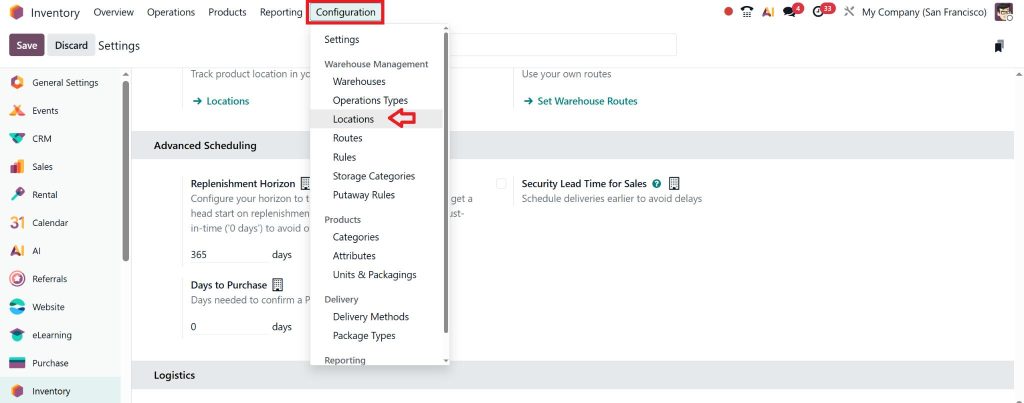
Here you will find all warehouse locations currently configured in Odoo.
Examples include:
- Stock
- Shelves
- Receiving Areas
- Packing Zones
- Quality Control Areas
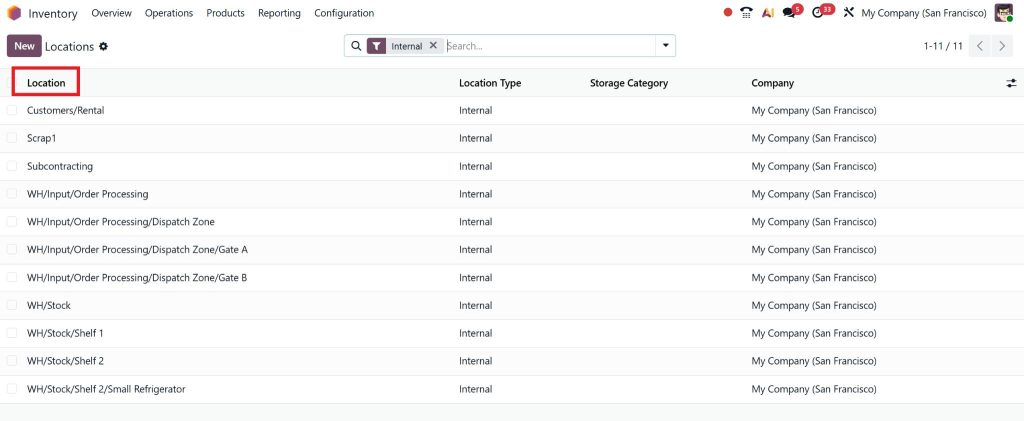
Select the location where cycle counting should be configured.
Step 3: Define Inventory Frequency
Inside the selected location:
Locate the inventory counting section.
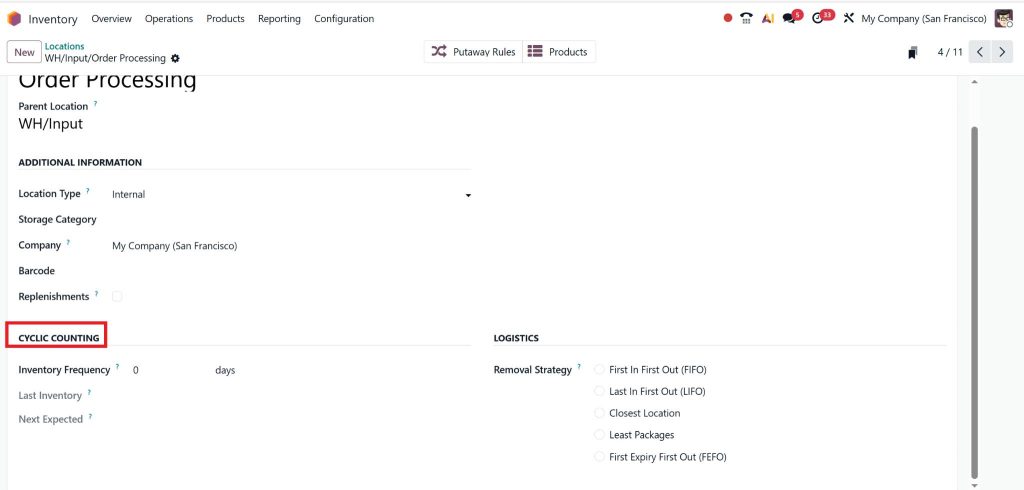
Specify the desired frequency.
Examples:
- Every 7 days
- Every 30 days
- Every 90 days
- Every 180 days
This setting determines how often inventory verification should occur.
The system uses this information to schedule future inventory counts automatically.
Step 4: Save Location Settings
After entering the frequency:
- Review the configuration
- Confirm accuracy
- Save changes
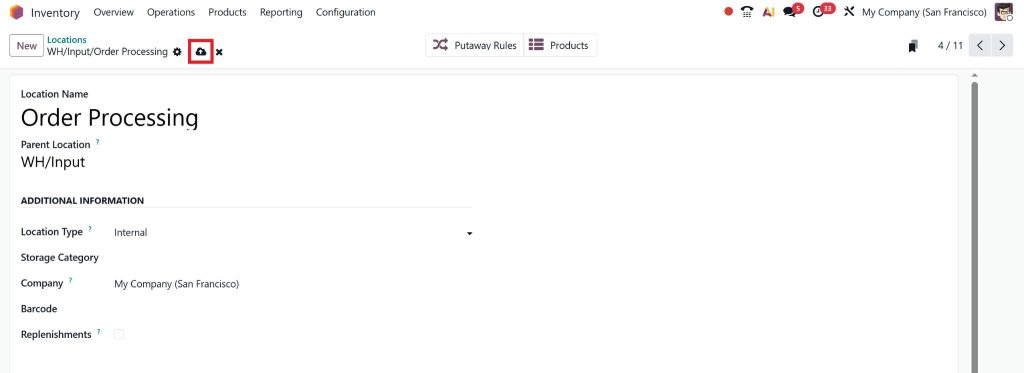
The location is now included in your cycle count program.
Step 5: Generate Inventory Counts
As counting dates approach, Odoo identifies locations requiring verification.
Warehouse staff can then perform physical counts for those locations.
This ensures regular monitoring of inventory accuracy.
Performing Odoo 19 Stock Count Activities
Once cycle count schedules are established, warehouse teams can begin conducting inventory counts.
Access Inventory Counts
Navigate to:
Inventory → Operations → Physical Inventory
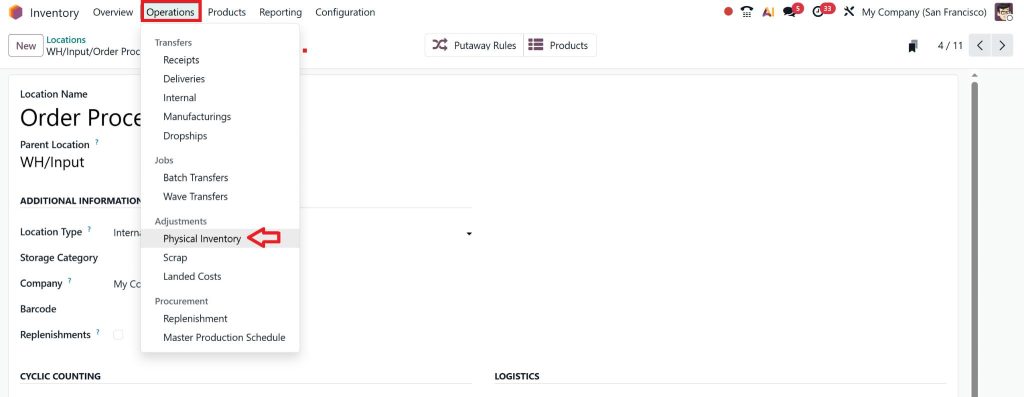
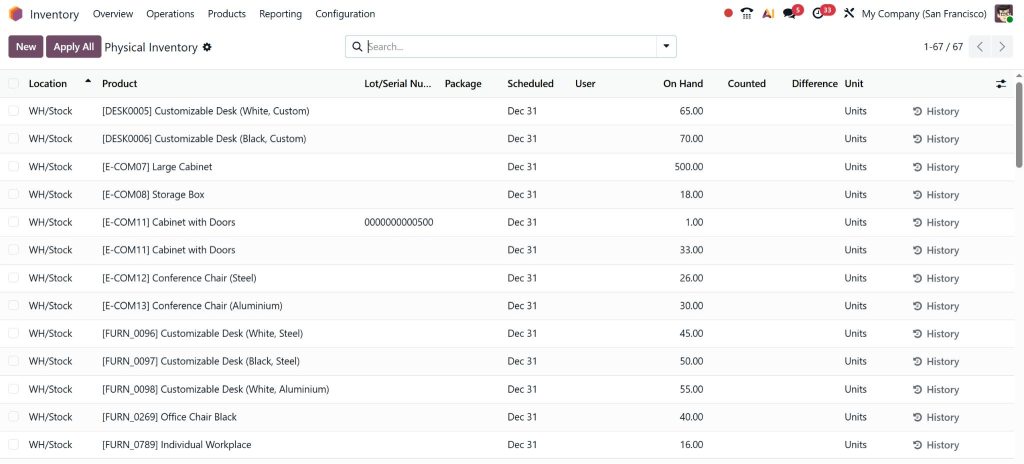
The system displays locations and products scheduled for counting.
Count Physical Inventory
Warehouse personnel:
- Visit storage locations
- Verify actual quantities
- Record counted stock
- Compare results with system quantities
Validate Results
After counting:
- Review discrepancies
- Confirm adjustments
- Approve inventory updates
This completes the Odoo 19 stock count process.
Example of Inventory Count Adjustment
Suppose the system shows:
- Product A = 500 Units
Physical count reveals:
- Product A = 492 Units
Difference:
- 8 Units Missing
Odoo records the discrepancy and allows authorized users to apply Odoo inventory adjustments.
Once validated, stock records are updated to reflect actual inventory.
Understanding Odoo Inventory Adjustments
Inventory adjustments are an essential part of cycle counting.
Whenever physical stock differs from system stock, adjustments are required.
Common Reasons for Adjustments
- Damaged products
- Lost inventory
- Theft
- Misplaced items
- Data entry errors
- Transfer mistakes
The Odoo inventory adjustments feature ensures inventory records remain accurate after discrepancies are discovered.
Benefits of Inventory Adjustments
- Accurate stock valuation
- Better financial reporting
- Improved purchasing decisions
- Reliable inventory forecasting
- Reduced inventory errors
Best Practices for Cycle Counting in Odoo 19
Simply enabling cycle counts is not enough. Businesses should follow best practices to maximize results.
Prioritize High-Value Inventory
Products with high financial value should be counted more frequently.
Examples:
- Electronics
- Medical supplies
- Precious materials
- Critical spare parts
Use ABC Inventory Classification
A common strategy involves dividing inventory into categories.
A Items
- High value
- High importance
- Count weekly or monthly
B Items
- Moderate value
- Count monthly or quarterly
C Items
- Low value
- Count quarterly or annually
This approach improves efficiency.
Count Fast-Moving Products More Often
Fast-moving inventory experiences more transactions and higher risk of discrepancies.
Examples include:
- Retail products
- Consumables
- Popular spare parts
Frequent counts improve inventory accuracy.
Train Warehouse Staff
Employee training is critical.
Staff should understand:
- Counting procedures
- Inventory locations
- Barcode scanning
- Data recording standards
Proper training reduces counting errors.
Investigate Recurring Discrepancies
If certain products repeatedly show inventory differences, businesses should identify the root cause.
Possible reasons include:
- Incorrect receiving
- Unauthorized stock movements
- Picking mistakes
- Process weaknesses
Continuous improvement helps reduce future discrepancies.
Common Challenges Solved by Cycle Counting in Odoo 19
Many businesses face inventory management challenges that affect operational performance.
Challenge 1: Stock Inaccuracies
Solution:
Regular cycle counting in Odoo keeps inventory records accurate.
Challenge 2: Time-Consuming Annual Counts
Solution:
Cycle counts spread inventory verification throughout the year.
Challenge 3: Warehouse Disruptions
Solution:
Small scheduled counts avoid complete warehouse shutdowns.
Challenge 4: Inventory Losses
Solution:
Frequent verification quickly identifies missing inventory.
Challenge 5: Poor Customer Service
Solution:
Accurate stock records improve order fulfillment.
How Odoo 19 Sales, Purchasing, and Inventory Work Together
Cycle counting becomes even more valuable because Odoo integrates inventory with other business functions.
Sales Integration
Accurate inventory data helps:
- Prevent overselling
- Improve delivery commitments
- Increase customer satisfaction
Purchasing Integration
Reliable stock records support:
- Better reorder planning
- Reduced emergency purchases
- Lower inventory costs
Accounting Integration
Inventory adjustments automatically impact valuation and financial records.
This integration ensures accurate reporting across departments.
Why Businesses Choose Netilligence for Odoo 19 Inventory Management
While Odoo 19 provides powerful inventory capabilities, successful implementation depends on proper configuration and business process alignment.
At Netilligence, we help businesses:
- Configure Odoo 19 Inventory Management
- Implement cycle count strategies
- Optimize warehouse operations
- Set up inventory automation
- Configure stock control workflows
- Customize inventory reports
- Integrate inventory with sales and purchasing
- Train warehouse teams
Our Odoo experts ensure that inventory processes match your operational requirements and support long-term business growth.
Whether you manage a single warehouse or multiple distribution centers, our team can help you implement a reliable and scalable inventory management solution.
How to Configure Cycle Counts in Odoo 19
Learning how to configure cycle counts in Odoo 19 is essential for organizations that want accurate inventory records and efficient warehouse operations. Through Odoo 19 cycle counts, businesses can maintain inventory accuracy without the disruption of full physical inventory counts.
The Odoo 19 inventory cycle count process allows companies to monitor stock regularly, identify discrepancies early, and perform necessary Odoo inventory adjustments. By using Odoo cycle count setup and configuring Odoo 19 location inventory frequency, warehouse teams can create a structured counting strategy tailored to their operations.
As inventory volumes grow, cycle counting in Odoo becomes increasingly important for maintaining control, improving decision-making, and supporting customer satisfaction. Combined with regular Odoo 19 stock count activities and efficient warehouse practices, businesses can achieve higher inventory accuracy and stronger operational performance.
If your organization wants to optimize inventory management and implement effective cycle counting processes, Netilligence can help you configure, customize, and support your Odoo 19 environment for maximum efficiency and long-term success.




