


Why Are Inventory Adjustments Happening More Often Than You Think?
You completed a stock count last month, corrected the quantities, and everything looked fine. A few weeks later, the same products need adjustments again. Then another warehouse reports missing stock. Soon, inventory teams start spending more time investigating differences than managing inventory itself.
Many companies perform Odoo inventory adjustments regularly, but very few take time to understand why those adjustments keep happening. Most businesses only focus on correcting inventory quantities. The real value comes from identifying the pattern behind those corrections.
This is why more companies are using Odoo AI inventory adjustment patterns analysis to understand recurring inventory issues before they become larger operational problems. When you can detect inventory adjustment patterns in Odoo AI, you move beyond fixing inventory errors and start finding their root causes.
Using inventory adjustment anomaly detection, Odoo AI inventory anomaly detection, and advanced AI inventory pattern detection, businesses can identify unusual inventory behavior, understand stock movement trends, and improve inventory accuracy across every warehouse.
If you have ever wondered how to detect inventory adjustments in Odoo, this guide will show you exactly what to look for, what the patterns mean, and how AI helps you find answers much faster.
What Are Inventory Adjustment Patterns and Why Should You Care?
Inventory adjustments are not random events. In most cases, they follow a pattern. A product that repeatedly shows shortages. A warehouse that records more corrections than others. A specific shift that creates more inventory discrepancies. These situations often repeat over weeks or months. When you identify these patterns, you stop treating every inventory adjustment as an isolated issue.
Instead, you start asking important questions:
- Why does this product require frequent corrections?
- Why are discrepancies increasing in one location?
- Why do inventory losses appear during specific periods?
- Why are the same stock items repeatedly adjusted?
Finding answers to these questions can reduce losses, improve inventory accuracy, and help your team spend less time correcting stock records.
How to Detect Inventory Adjustment Patterns in Odoo AI?
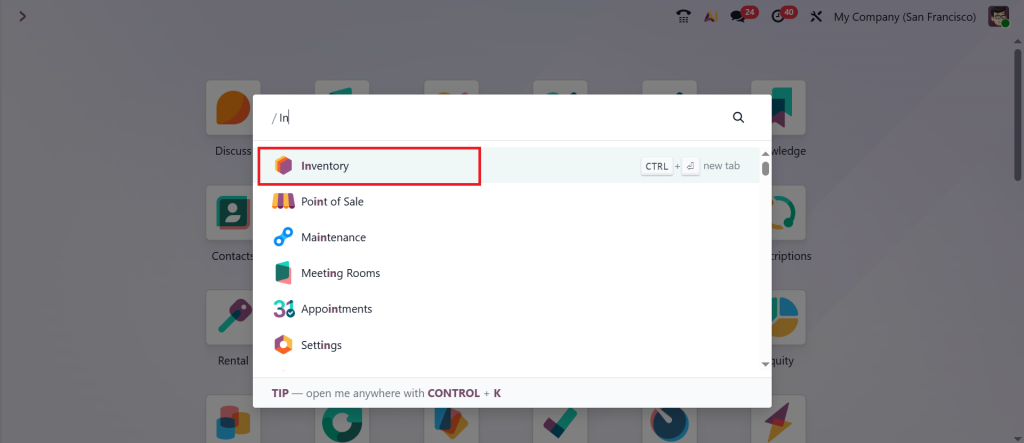
To successfully detect inventory adjustment patterns in Odoo AI, organizations must combine inventory data, stock movement records, and AI-powered analytics. Start by opening the Inventory module and reviewing past inventory adjustments. Open the Inventory module.
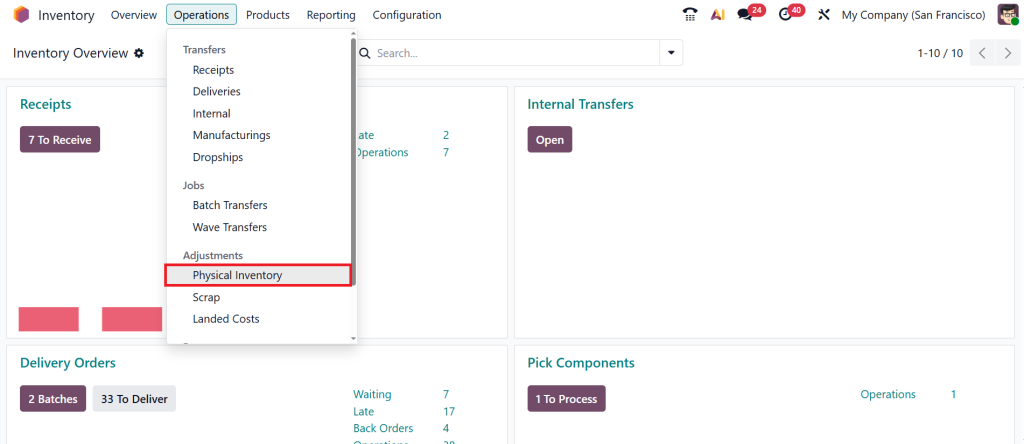
Go to Operations → Physical Inventory.
Click on AI.
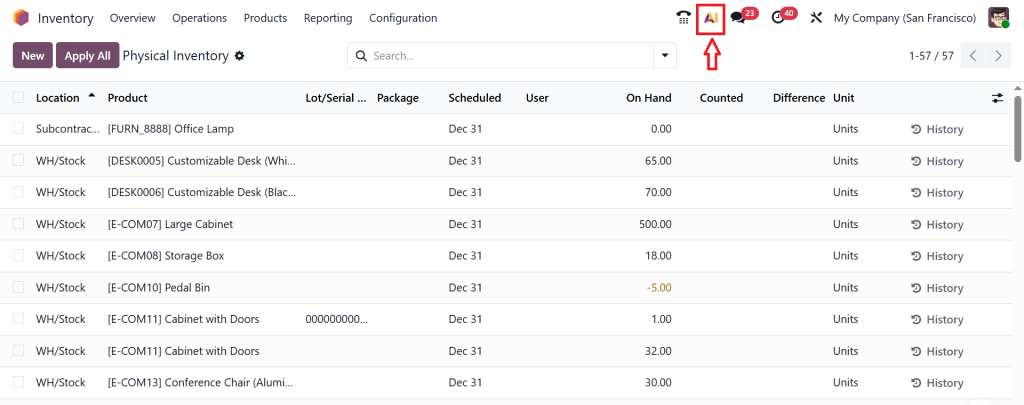
And Look for:
- Products with frequent quantity corrections
- Repeated negative adjustments
- Large stock differences
- Products adjusted multiple times within a short period
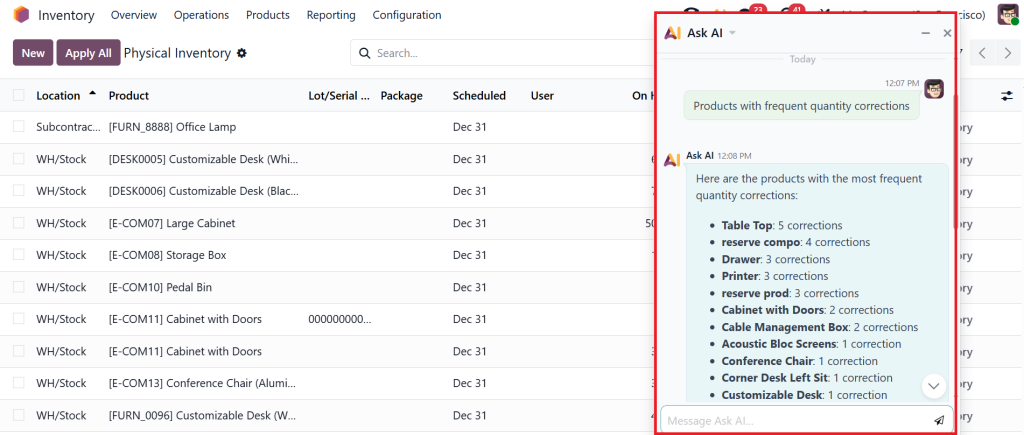
When the same products appear repeatedly in adjustment records, it often indicates an underlying inventory issue rather than a one-time mistake.
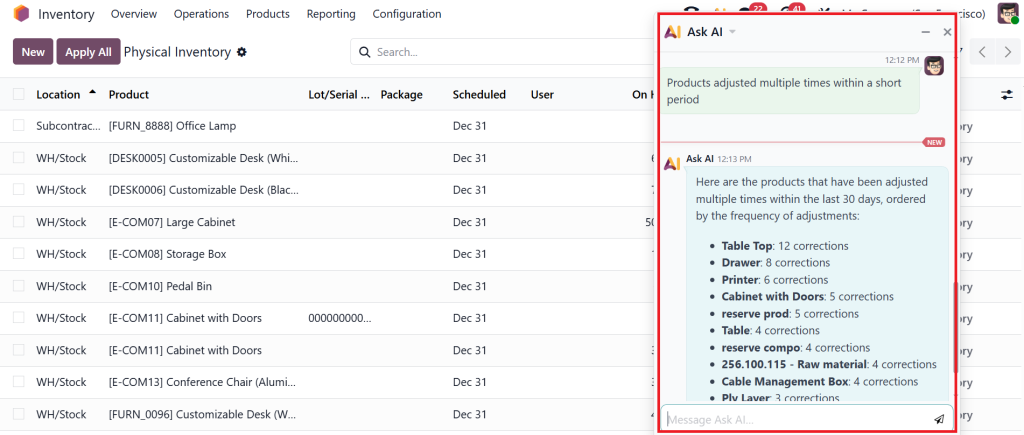
After identifying adjusted products, compare their adjustment history over several weeks or months.
Focus on:
- How often adjustments occur
- Whether stock is usually increased or decreased
- The quantity difference in each adjustment
For example, if a product consistently loses 5–10 units every month, the pattern suggests an operational issue that requires investigation.
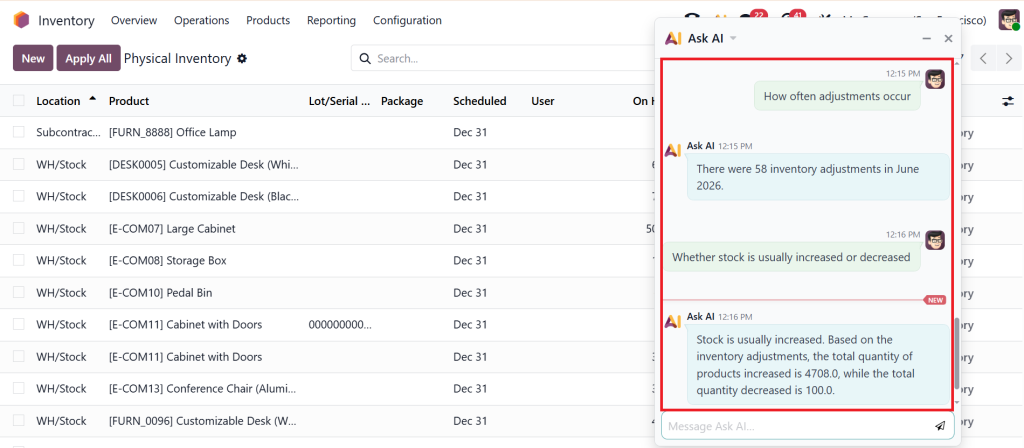
This is one of the most effective ways to detect inventory adjustment patterns in Odoo 19 AI.
How Odoo AI Inventory Adjustment Patterns Reveal Hidden Inventory Problems?
Looking at inventory reports manually can take hours and still leave important details unnoticed. AI works differently. When analyzing Odoo AI inventory adjustment patterns, the system reviews thousands of inventory transactions and searches for behaviors that repeat over time.
Instead of only showing adjustment records, AI highlights trends such as recurring shortages, unusual quantity corrections, repeated warehouse discrepancies, and products that frequently require inventory corrections.
These insights help inventory managers focus on problems that actually need attention instead of reviewing every adjustment individually. In many cases, businesses discover issues they never knew existed simply because AI connects data points that are difficult to spot manually.
How to Detect Inventory Adjustments in Odoo Using Historical Data?
The first step in understanding inventory adjustments is reviewing historical inventory data. Every stock correction leaves a record inside Odoo. Over time, these records create a valuable source of information.
When reviewing historical adjustments, look for:
- Products adjusted multiple times
- Repeated negative stock corrections
- Large quantity differences
- Frequent warehouse-specific adjustments
- Seasonal inventory discrepancies
Historical analysis shows whether adjustments are isolated incidents or recurring problems. If the same issue appears repeatedly, there is usually an operational reason behind it. AI helps identify these recurring behaviors much faster than traditional reporting methods.
Odoo AI Inventory Anomaly Detection Helps You Find Unusual Activity Quickly
Not every inventory adjustment is a concern. Small corrections occasionally happen in every warehouse. The challenge is identifying adjustments that fall outside normal behavior. This is where Odoo AI inventory anomaly detection becomes valuable. AI compares current inventory activity with historical trends and immediately highlights unusual situations.
Examples include:
- Adjustment quantities much larger than normal
- Sudden increases in inventory losses
- Unexpected stock shortages
- Products showing unusual correction frequency
- Warehouses reporting abnormal inventory differences
Instead of waiting until month-end inventory reviews, teams can investigate issues as soon as unusual activity appears. This reduces delays and prevents small discrepancies from becoming larger inventory problems.
Inventory Adjustment Anomaly Detection Identifies Problems Before They Grow
Most inventory issues start small. A few missing units this week. Slight quantity differences next month. More adjustments the following quarter. By the time these discrepancies become visible in financial reports, the business may already be dealing with significant inventory losses.
Inventory adjustment anomaly detection focuses on identifying these warning signs early. AI continuously evaluates adjustment behavior and looks for patterns that differ from normal inventory activity.
For example, if a product usually receives two adjustments per month but suddenly requires ten adjustments, the system can flag it for review. The earlier these anomalies are detected, the easier they are to investigate and resolve.
AI Inventory Pattern Detection Shows Which Products Need Attention
Some products naturally experience more inventory issues than others. High-demand products move frequently. Fragile products may experience damage. Small items are often more difficult to track accurately. Through AI inventory pattern detection, businesses can identify products that consistently generate inventory corrections.
The system analyzes:
- Adjustment frequency
- Adjustment quantities
- Inventory turnover
- Stock movement history
- Loss trends
Products with recurring discrepancies can then be reviewed more closely. This allows inventory teams to focus their efforts where the risk is highest rather than reviewing every product equally.
Odoo Stock Movement Analysis Explains Why Inventory Differences Occur
Inventory adjustments rarely happen without a reason. Most discrepancies originate from inventory movement activities such as receiving, storage, transfers, picking, packing, or shipping. This is why Odoo stock movement analysis is an important part of inventory investigation. By analyzing stock movements, businesses can see exactly how inventory traveled through the warehouse before an adjustment occurred.
This often reveals problems such as:
- Incorrect receiving quantities
- Transfer mistakes
- Picking errors
- Duplicate transactions
- Missing stock records
When inventory movements are reviewed alongside adjustment records, the root cause becomes much easier to identify.
Inventory Shrinkage Detection Odoo Helps Reduce Stock Losses
Inventory shrinkage remains one of the most costly challenges for warehouse operations. Losses may occur because of theft, damage, administrative errors, supplier discrepancies, or poor inventory handling.
Traditional inventory audits often discover shrinkage after the loss has already occurred. With inventory shrinkage detection in Odoo, AI continuously monitors inventory activity and identifies unusual loss patterns.
The system can highlight:
- Products with increasing shortages
- Warehouses with higher shrinkage rates
- Locations experiencing repeated losses
- Inventory categories showing abnormal discrepancies
These insights help businesses investigate inventory losses sooner and take corrective action before the problem expands.
Why Warehouse-Level Analysis Matters in Odoo Inventory Adjustments?
Many businesses operate multiple warehouses, stores, or storage locations. When reviewing Odoo inventory adjustments, it is important to compare adjustment behavior across locations. If one warehouse consistently records more corrections than others, that difference deserves attention.
The issue may be related to:
- Local processes
- Staff training
- Inventory handling practices
- Security controls
- Receiving procedures
AI helps identify these location-based trends quickly by comparing inventory performance across all facilities. This provides a much clearer picture of where improvements are needed.
How AI Helps Inventory Teams Spend Less Time Investigating Data?
Inventory managers often spend significant time reviewing reports, spreadsheets, and adjustment records. The challenge is not the lack of data. The challenge is finding meaningful insights within that data.
AI reduces manual investigation by automatically highlighting:
- High-risk products
- Unusual adjustment activity
- Repeating discrepancy patterns
- Inventory loss trends
- Operational exceptions
Instead of reviewing hundreds of transactions, teams can focus on the specific issues requiring immediate attention. This improves productivity while supporting better inventory decisions.
Best Practices for Detecting Inventory Adjustment Patterns in Odoo AI
Successful inventory analysis depends on both technology and process discipline. To get accurate results from AI analysis. Maintain accurate inventory records and update transactions promptly. Conduct regular cycle counts to verify stock accuracy.
Standardize inventory procedures across all warehouses. Investigate recurring adjustments instead of only correcting quantities. Review inventory trends regularly rather than waiting for annual audits. The quality of AI insights depends heavily on the quality of inventory data being analyzed. Accurate data produces more reliable pattern detection and stronger decision-making.
What Businesses Gain When They Detect Inventory Adjustment Patterns in Odoo AI?
Companies that successfully detect inventory adjustment patterns in Odoo AI gain much more than accurate inventory records. They gain visibility into operational weaknesses that often remain hidden for months.
By combining Odoo AI inventory adjustment patterns, businesses can identify recurring inventory issues, reduce stock losses, improve warehouse efficiency, and make better inventory decisions.
Most importantly, they stop reacting to inventory discrepancies and start understanding why those discrepancies occur in the first place.
Stop Correcting Inventory and Start Understanding It
Many businesses view inventory adjustments as routine warehouse activities. In reality, every adjustment tells a story about how inventory is being managed.
When adjustments are analyzed properly, they reveal process gaps, operational risks, inventory losses, and opportunities for improvement.
Understanding how to detect inventory adjustments in Odoo using AI allows businesses to move beyond basic inventory correction and focus on continuous improvement.
If your team frequently performs inventory corrections, the next question should not be how to fix the quantity. The question should be why the adjustment happened in the first place. That is the insight AI helps discover.
Looking to implement advanced Odoo AI reporting, inventory analytics, or custom inventory monitoring dashboards?
Netilligence can help you build smarter inventory management processes that improve visibility, accuracy, and operational control across your business.




