

Access Rights in Odoo 19 Accounting: Why It Matters More Than Ever
Access Rights in Odoo 19 Accounting play a decisive role in securing your company’s most sensitive financial data. From invoices and vendor bills to tax reports and journals, accounting information must be accessible only to the right people at the right time with the correct permissions.
In modern businesses, accounting teams are no longer limited to a single bookkeeper or accountant. CFOs, auditors, finance managers, sales teams, and even operations staff may require partial access to financial records. Without structured Access Rights in Odoo 19 Accounting, businesses risk data leaks, fraud, errors, and compliance violations.
Odoo 19 introduces improved and more flexible access rights management, allowing companies to define clear accounting roles, control user permissions, and enhance accounting security without complexity.
Whether you are a startup, SME, or enterprise, mastering Access Rights in Odoo 19 Accounting ensures:
- Strong financial security
- Error-free bookkeeping
- Regulatory compliance
- Smooth internal workflows
In this guide by Netilligence – Odoo Partner, you will learn how to manage accounting user types, roles, and permissions effectively using Odoo 19.
How to Manage User Permissions in Odoo 19 Accounting (Step-by-Step)
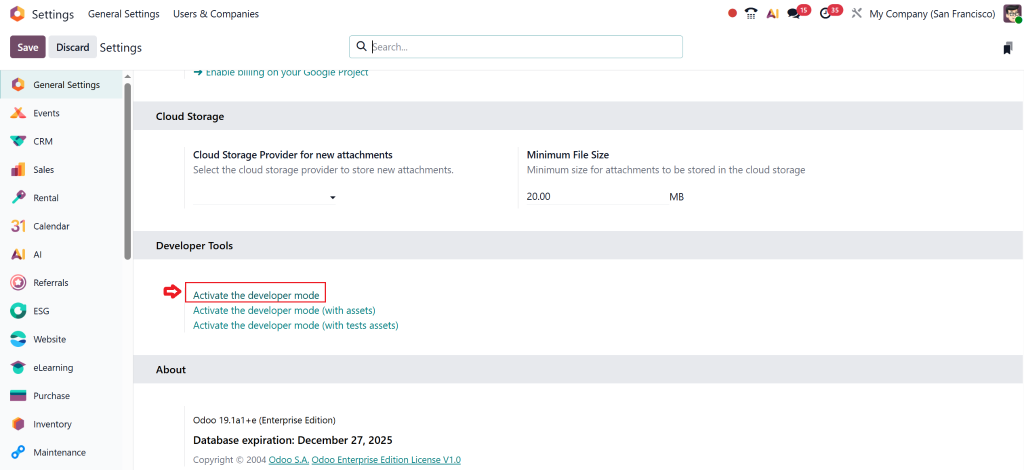
Step 1: Enable Developer Mode
Go to Settings → Activate Developer Mode.
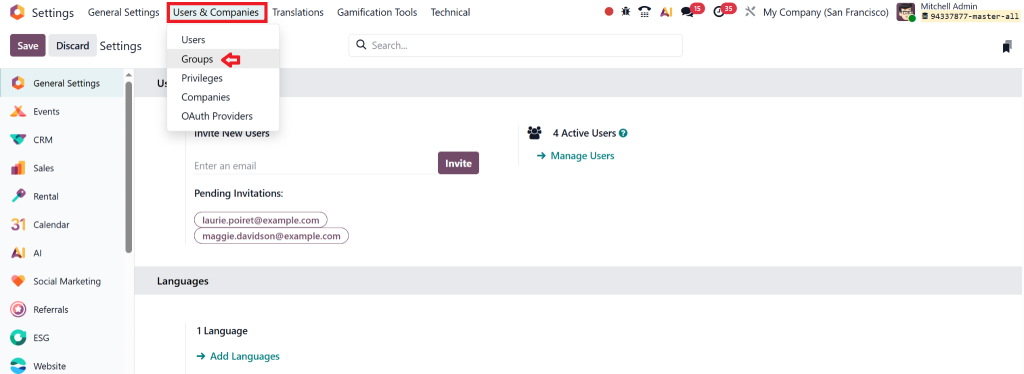
Step 2: Configure User Groups
- Navigate to Settings → Users & Companies → Groups
- Select Accounting groups
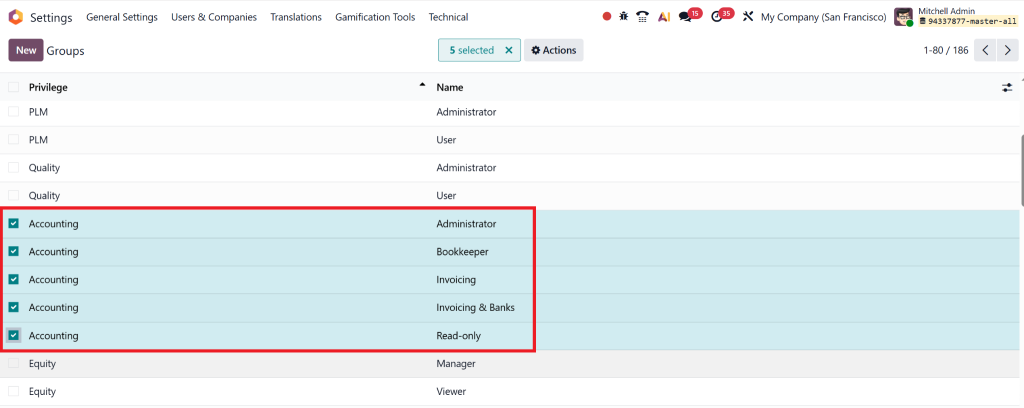
- Edit permissions as needed
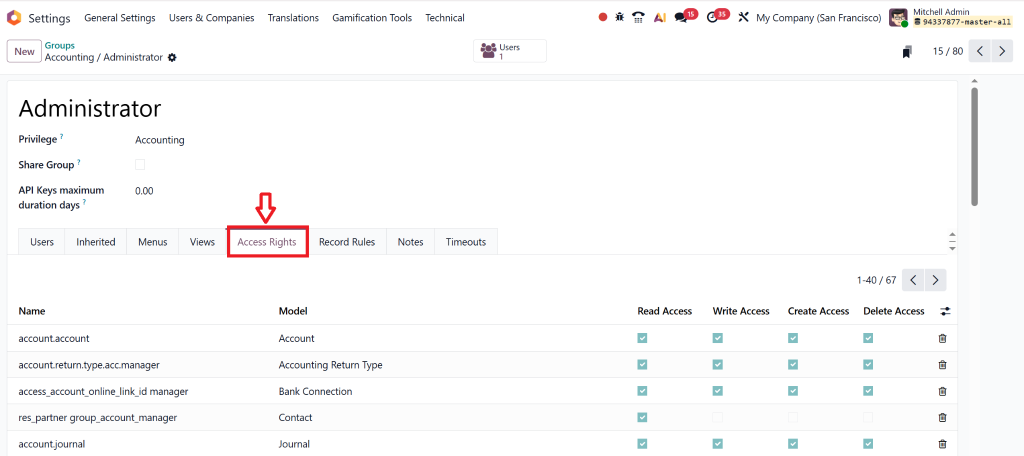
Step 3: Assign Roles to Users
- Open Users
- Assign correct accounting groups
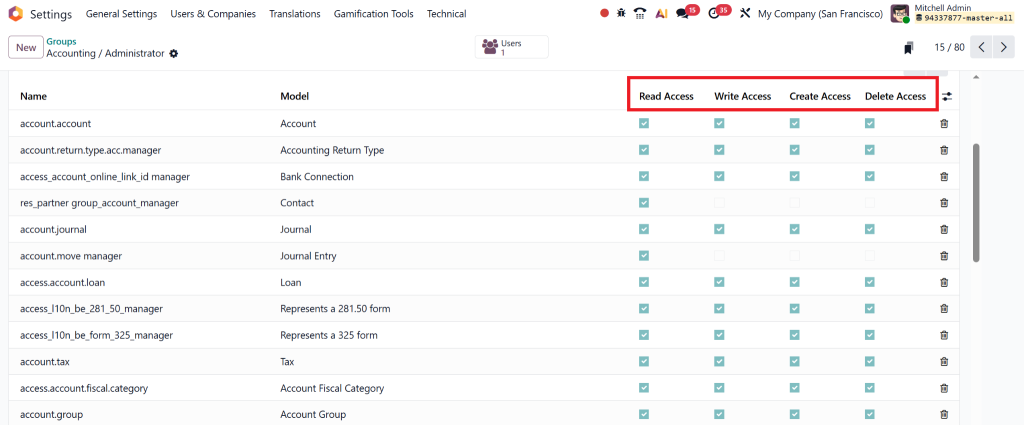
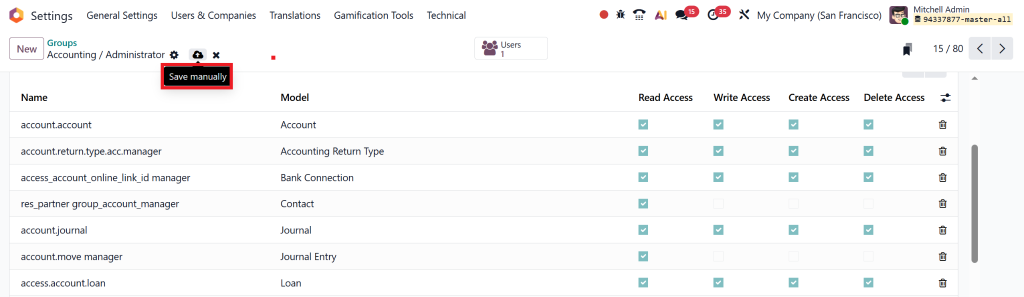
- Save changes
Step 4: Test Access Rights
Always test with a sample user to confirm:
- Correct visibility
- No unauthorised access
Proper setup ensures error-free Access Rights in Odoo 19 Accounting.
Understanding User Types in Odoo 19 Accounting
Before configuring Access Rights in Odoo 19 Accounting, it is essential to understand how Odoo categorises users.
Odoo 19 Accounting User Types Explained
Odoo uses role-based access control (RBAC), where users are assigned to predefined or custom groups.
Common accounting-related user types include:
- Accountant
- Billing User
- Accounting Manager
- Read-Only User
- Auditor
- Administrator
Each user type comes with preset permissions that determine what they can view, create, edit, approve, or delete within the accounting module.
Why User Types Are Critical for Accounting Security
Without clearly defined user types:
- Unauthorized users may modify financial data
- Sensitive reports may be exposed
- Internal fraud risks increase
Proper Access Rights in Odoo 19 Accounting ensure accountability and transparency across departments.
Access Rights in Odoo 19 Accounting: Core Structure
How Access Rights Work in Odoo 19
Odoo controls accounting access through three key layers:
- User Groups
- Access Control Lists (ACLs)
- Record Rules
Together, these elements form the foundation of Access Rights in Odoo 19 Accounting.
1. User Groups in Odoo 19
User groups define what users can see and do.
Examples:
- Accountant → Can manage invoices and payments
- Billing Clerk → Can create customer invoices only
- Accounting Manager → Full control over accounting
Assigning users to the correct group is the first step in managing access rights in Odoo 19.
2. Access Control Lists (ACLs)
ACLs define permissions such as:
- Read
- Write
- Create
- Delete
For example:
- An accountant may read & write
- An auditor may read only
Well-configured ACLs prevent unauthorized actions in accounting workflows.
3. Record Rules
Record rules decide which records a user can access.
Example:
- A branch accountant sees only branch-specific invoices
- A group CFO sees consolidated records
This granular approach strengthens Odoo accounting access control.
Standard Accounting Roles Available in Odoo 19
Odoo 19 provides predefined accounting roles:
Billing User
- Create customer invoices
- View payment status
- No access to financial reports
Accountant
- Manage vendor bills
- Reconcile bank statements
- Handle taxes and journals
Accounting Manager
- Full accounting control
- Approve journals
- Lock fiscal periods
Each role is designed to maintain secure Access Rights in Odoo 19 Accounting while promoting efficiency.
Custom Accounting Roles for Your Business
Every business is unique. Odoo 19 allows you to create custom roles based on your internal structure:
- Junior accountant
- External auditor
- Finance executive
Custom roles ensure flexible access rights management without compromising security.
Best Practices for Odoo 19 Accounting Security
Follow the Principle of Least Privilege
Give users only what they need.
Separate Accounting Duties
Split responsibilities between:
- Invoice creation
- Payment approval
- Reporting
Regularly Audit User Access
Remove unused or outdated permissions.
Use Multi-Level Approval Workflows
Reduce fraud and prevent single-user control.
Strong Odoo accounting security protects your financial integrity.
Common Mistakes Businesses Make with Accounting Access Rights
- Granting full access to multiple users
- Ignoring audit trails
- Not revoking access of ex-employees
- Using shared logins
Avoiding these mistakes strengthens Access Rights in Odoo 19 Accounting and ensures compliance.
Why Choose Netilligence for Odoo 19 Accounting Setup?
As an Official Odoo Partner, Netilligence brings unmatched expertise in:
- Odoo 19 accounting user types
- Advanced access rights management
- Secure accounting workflows
- Compliance-driven ERP implementation
We do not just configure software, we design secure financial ecosystems tailored to your business needs.
Our experts ensure:
- Zero financial data leaks
- Smooth accounting operations
- Future-ready scalability
Take Control with Access Rights in Odoo 19 Accounting
Access Rights in Odoo 19 Accounting are not optional; they are essential. Proper permission management prevents errors, protects sensitive data, and builds trust across your organization.
Whether you are migrating to Odoo 19 or optimizing your current setup, accounting security should never be an afterthought.
Ready to secure your accounting system?
Let Netilligence, an Odoo Partner, help you implement robust, compliant, and future-proof accounting access controls.




