

Understanding Partial Goods Receiving and Backorders in Odoo 19
Running a business means managing a lot of moving parts – inventory, orders, suppliers, and customers. One of the most common challenges businesses face is dealing with Manage Partial Goods Receiving and backorders.
In simple terms, partial goods receiving happens when a business orders items from a supplier but receives only part of the order. Backorders occur when some items from a purchase order are not available at the time of delivery, and the remaining items are put on hold until they are back in stock.
Odoo 19, a comprehensive business management software, makes managing these challenges easy and efficient. It helps businesses streamline the process of partial goods receiving and backorder management. In this guide, we’ll explain how to manage partial goods receiving in Odoo 19, ensuring that your inventory is always accurate and that your customers stay happy. We’ll break down the steps in a way that’s easy for anyone, even beginners, to understand.
What is Partial Goods Receiving in Odoo 19?
Partial goods receiving occurs when a supplier delivers only a portion of the ordered items instead of the full quantity. This situation is very common in supply chain operations due to reasons such as:
- Supplier stock shortages
- Transportation delays
- Large order quantities delivered in batches
- Production scheduling by suppliers
Instead of waiting for the complete shipment, businesses can record the received items immediately using Odoo 19’s partial goods receiving.
This allows companies to start using available products while tracking the remaining items separately.
Why Businesses Need Partial Goods Receiving
Businesses benefit significantly when they Manage Partial Goods Receiving efficiently.
Some major advantages include:
1. Faster Warehouse Operations
Warehouse teams can process received items immediately instead of waiting for the full order.
2. Accurate Inventory Tracking
Using partial goods receipt in Odoo 19, stock levels remain accurate and updated in real time.
3. Better Supplier Tracking
Businesses can easily identify pending shipments and follow up with suppliers.
4. Improved Production Planning
Manufacturers can start production using available materials without delays.
5. Clear Backorder Management
With Odoo 19 inventory backorder management, pending quantities are tracked automatically.
How Odoo 19 Handles Partial Goods Receipt and Backorders
One of the strongest advantages of Odoo is its intelligent inventory workflow. The system automatically manages pending quantities when partial deliveries occur.
Using Odoo 19 GRN partial receipt and backorder, the system performs several tasks automatically:
- Records received products in inventory
- Updates stock levels instantly
- Creates a backorder for the remaining items
- Links the backorder with the original purchase order
This automation helps businesses maintain transparency in their purchasing process.
For example:
Purchase Order: 100 units ordered
Received: 60 units
Odoo will automatically:
- Accept the 60 units into inventory
- Create a backorder for the remaining 40 units
This is part of the Odoo 19 purchase order partial delivery workflow, making inventory tracking much easier.
Step-by-Step Guide: How to Manage Partial Goods Receiving in Odoo 19
1. Creating a Purchase Order in Odoo 19
The first step in managing partial goods receiving is creating a purchase order in Odoo 19.
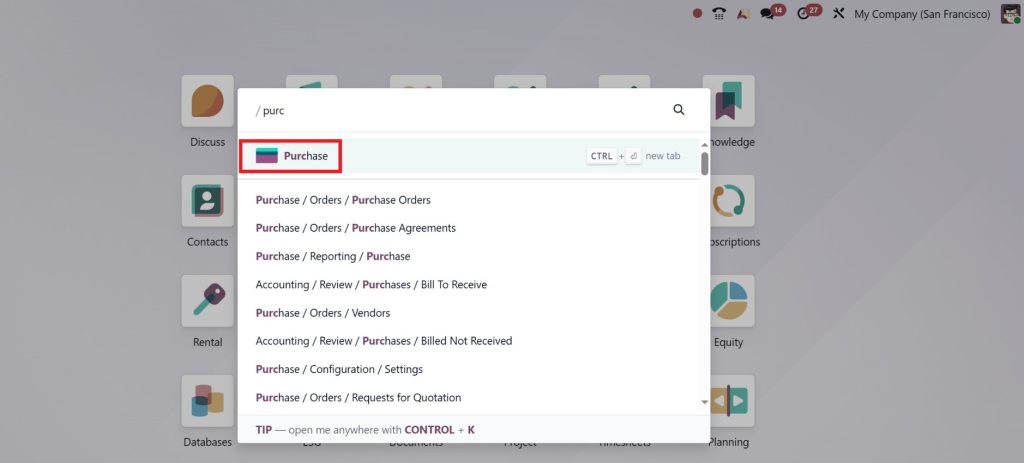
- Go to the Purchase module in Odoo.
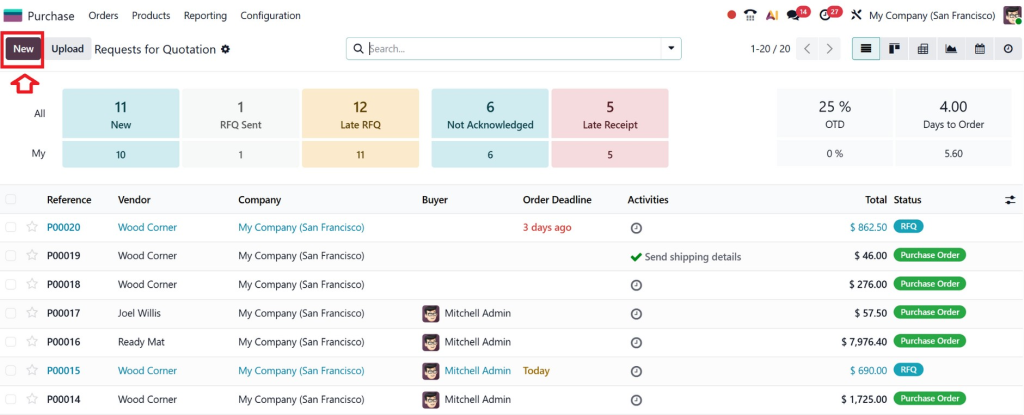
- Click on Create to start a new purchase order.
- Select the Supplier, and then add the products and quantities you want to purchase.
- Confirm the purchase order by clicking on Confirm Order.
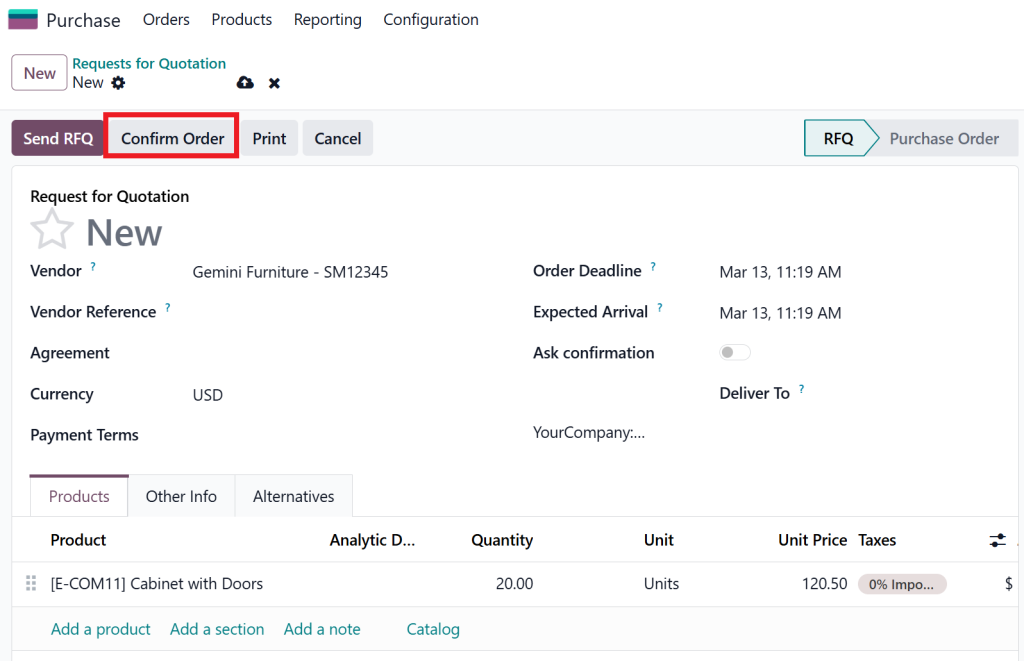
Once you confirm the order, Odoo will automatically create a purchase receipt for the items you ordered.
2. Receiving Partial Goods in Odoo 19
When part of the order arrives, follow these steps to receive the goods:
- Go to the Purchase Order that you created.
- Under the Receipts tab, you will see an option to receive the goods.
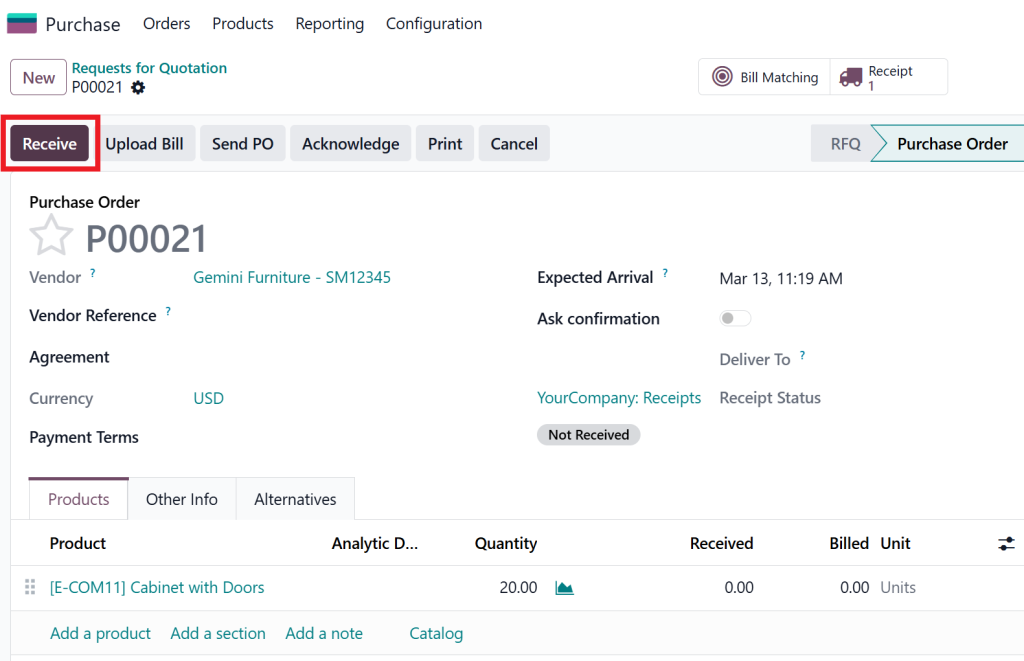
- Click on Receive, and Odoo will prompt you to enter the quantity you’ve received.
- If only 10 out of 20 items have arrived, enter 10 in the quantity field.
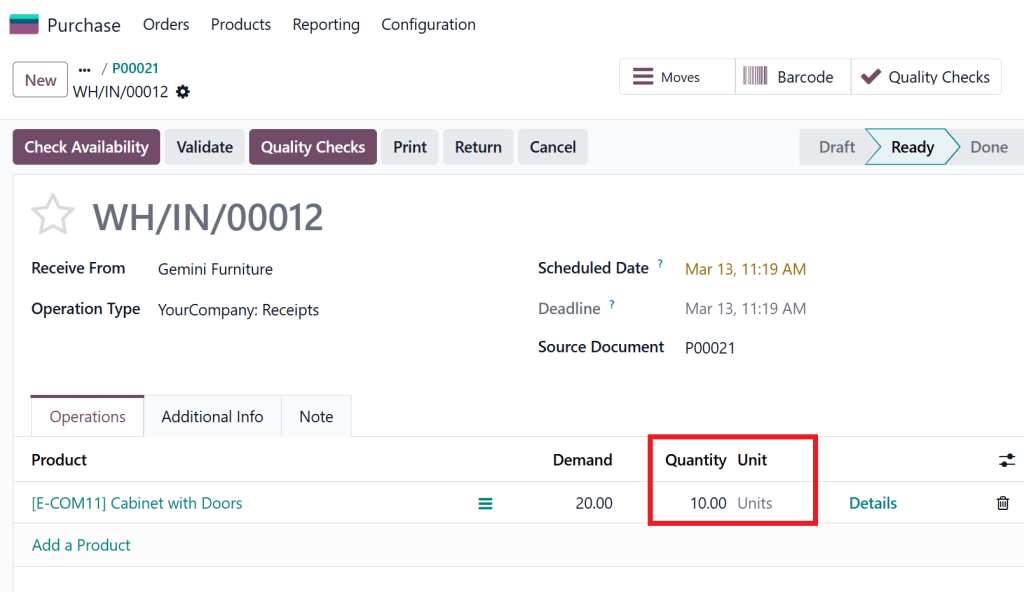
Once the partial goods are received, Odoo updates the inventory and the purchase order to show that part of the order has been fulfilled. The remaining items will automatically be placed on backorder.
3. Automatically Generating Backorders in Odoo 19
When you receive partial goods in Odoo 19, the system will automatically create backorders for the items that were not delivered.
Here’s how the backorder process works:
- After you receive the partial goods, Odoo will check the quantity ordered versus the quantity received.
- The system will automatically generate a backorder for the unfulfilled items. This backorder is linked to the original purchase order and tracks the remaining quantity.
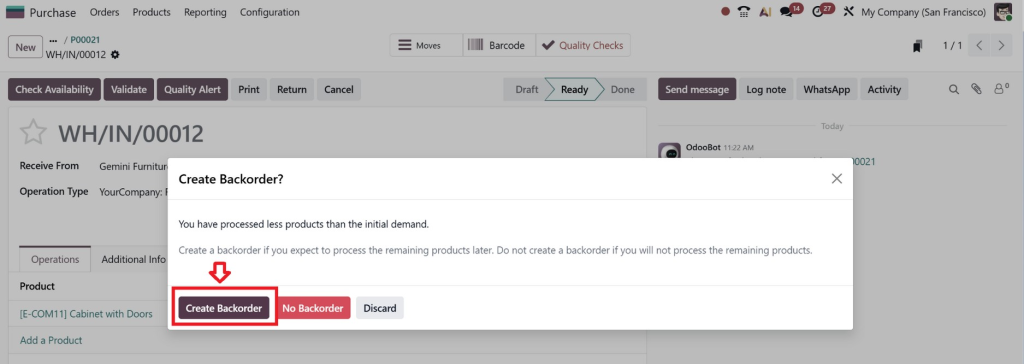
- You can view and manage the backorder just like a regular purchase order. Once the supplier delivers the remaining goods, the backorder is updated.
4. Managing Backorders in Odoo 19
Managing backorders is essential to ensure that your inventory remains accurate and your business operations continue smoothly.
To manage backorders in Odoo 19:
- Go to the Purchase Order or Backorder linked to the original purchase order.
- Odoo will automatically show the status of the backorder, so you can track when the goods are expected to arrive.
- Once the remaining items are delivered, go back to the purchase order and receive the goods, just like you did with the partial delivery.
- The backorder will then be marked as complete.
Best Practices for Managing Partial Goods Receiving & Backorders in Odoo 19
Here are some best practices to ensure smooth management of partial goods receiving and backorders in Odoo 19:
1. Keep Your Purchase Orders Updated
When receiving partial goods, always make sure to update the purchase order with the quantities you’ve actually received. This ensures that your inventory and backorders are correctly updated in the system.
2. Set Up Notifications for Backorders
Odoo 19 allows you to set up notifications for backorders. You can receive an email alert whenever a backorder is created, when an item is shipped, or when the backorder is fulfilled. This ensures you’re always aware of the status of your orders.
3. Use Odoo’s Reporting Tools
Odoo offers powerful reporting tools to track the status of your backorders and partial goods receiving. You can generate reports to analyze supplier performance, monitor order fulfillment, and manage inventory levels effectively.
Benefits of Managing Partial Goods Receiving & Backorders in Odoo 19
Odoo 19 offers several benefits when it comes to handling partial goods receiving and backorders:
- Accurate Inventory Management: By updating your inventory as soon as goods are received, even partially, Odoo ensures that your stock levels are always up-to-date.
- Enhanced Order Fulfillment: With backorder management in Odoo 19, you can easily track outstanding items and fulfill customer orders as soon as the goods arrive.
- Better Supplier Communication: Managing backorders gives you a clear overview of what items are still pending, allowing you to follow up with suppliers effectively.
- Updated Business Operations: Odoo automates the partial goods receiving and backorder process, saving you time and reducing errors compared to manual tracking.
Lead Partial Goods Receiving & Backorders with Odoo 19
Managing partial goods receiving and backorders can be a complex task, but with Odoo 19, it becomes a smooth and efficient process. Odoo’s purchase order management system allows you to receive partial deliveries, automatically generate backorders, and keep track of your inventory all in one place.
By following the simple steps outlined in this guide, you can manage partial goods receiving and backorders with ease, ensuring smooth operations and satisfied customers. Whether you’re dealing with small orders or large shipments, Odoo 19 has the tools you need to stay organized and efficient.
With its automated workflows and comprehensive reporting tools, Odoo 19’s inventory backorder management is a game-changer for businesses looking to streamline their supply chain. Start using Odoo 19 today and take control of your inventory, improve your backorder management, and boost your customer satisfaction.




