

Partial Payments in Odoo 19 POS
Imagine a POS that does more than log transactions. Picture it handling payments while giving shoppers control over how they pay, all without messing up your books. Odoo 19 provides this capability through Manage Partial Payments in POS setup. Yet many overlook it, losing precious hours, revenue, and return visits in the process.
A person enters, asks to pay only a portion of the cost, then walks away with the remaining balance unpaid. Usually, such moments spark mix-ups, missteps, or after-hours chasing – yet with Odoo 19 POS handling payments through customer accounts, things flow smoothly instead. This part? Few realise there’s an even more effective method for managing part-payments using POS in Odoo 19 – one tucked away, rarely noticed by regular operators.
Splitting deposits by cash or credit wasn’t just added – it now runs quietly behind purchases. Outstanding invoices once hunted in spreadsheets now sync through the system without effort. Customer-held credits now accept part payments, turning each sale into a step forward. Revenue grows when payments stretch just a little longer. Cash moves faster since delays get noticed sooner. Relationships deepen because customers feel supported, not chased.
Ever ask what really goes on behind the scenes? Inside this walkthrough, every move to handle split deposits in Odoo 19’s POS gets laid bare – no guesswork needed. What if smooth cash flow didn’t have to feel like guesswork? Picture a shop owner juggling multiple transactions – now imagine them doing it without hiccups. It’s not magic, just methods most skip learning.
Why Managing Partial Payments in Odoo 19 POS is Important
Allowing partial payments in POS is more than a convenience; it’s a strategic advantage. Here’s why Odoo 19 POS partial payments are essential:
- Flexibility for Customers – Offering customers the option to pay in part increases satisfaction and encourages repeat purchases.
- Cash Flow Management – Businesses can record revenue immediately while deferring part of the payment.
- Accurate Accounting – Odoo automatically tracks partial payments, customer credits, and outstanding balances.
- Improved Sales Opportunities – Customers are more likely to make larger purchases when they can pay in instalments.
- Error Reduction – Manual mistakes are minimised when using Odoo 19 POS customer account payment functionality.
In short, knowing how to manage partial payment in Odoo 19 POS can transform your POS system into a customer-friendly, revenue-maximising tool.
Step 1: Enable Customer Accounts in POS
Before you can start accepting partial payments, you need to configure your POS:
- Navigate to Point of Sale.
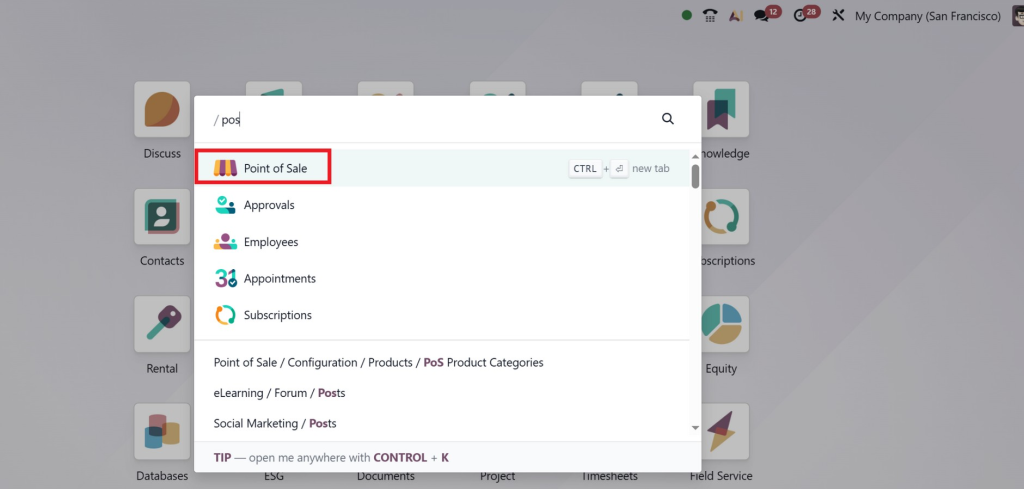
- In the POS Module, Customer Credit and Multi-Payment Methods are already enabled.
Enabling customer accounts in Odoo POS allows your POS to record deferred payments and process partial payments using customer credit.
Pro Tip: Always test the configuration with a dummy customer to ensure everything works as expected before going live.
Step 2: Adding a Customer to the POS Order
When a customer wants to make a partial payment, linking them to the order is essential:
- Go to a shop and select the products in your POS interface.
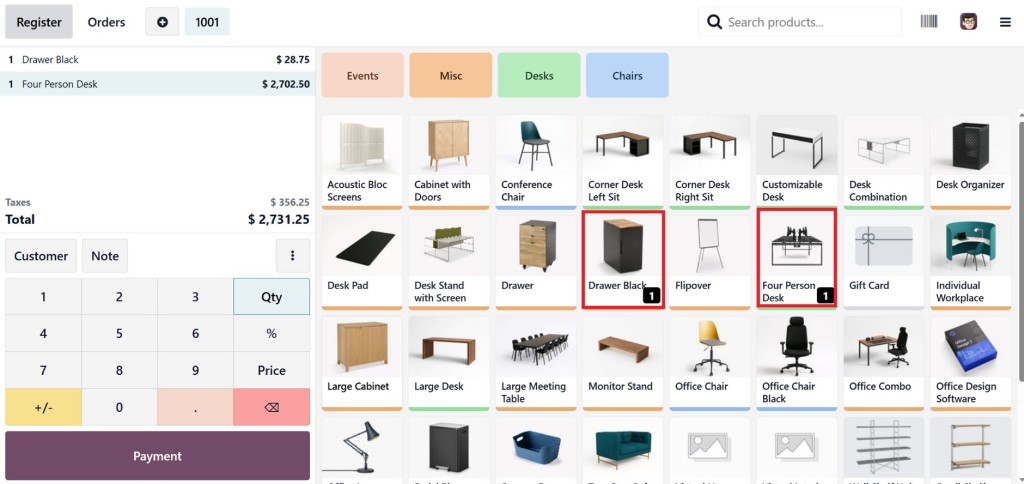
- Click Select Customer and choose an existing customer or create a new one.
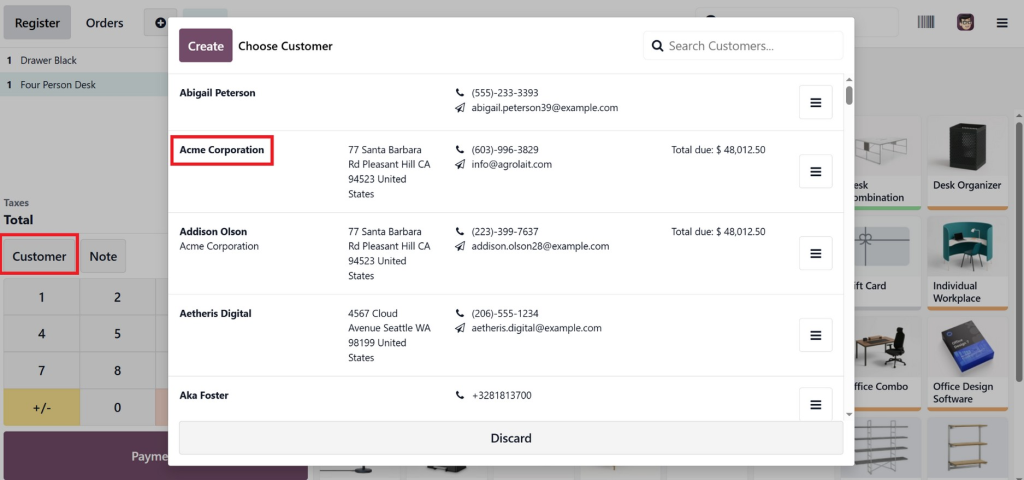
- This enables Odoo to track outstanding balances in Odoo POS, ensuring accurate reporting of due amounts.
Without this step, you won’t be able to record remaining balances or effectively offer Odoo 19 POS customer account payment.
Step 3: Processing Partial Payments
Processing partial payments in Odoo 19 POS is simple and flexible:
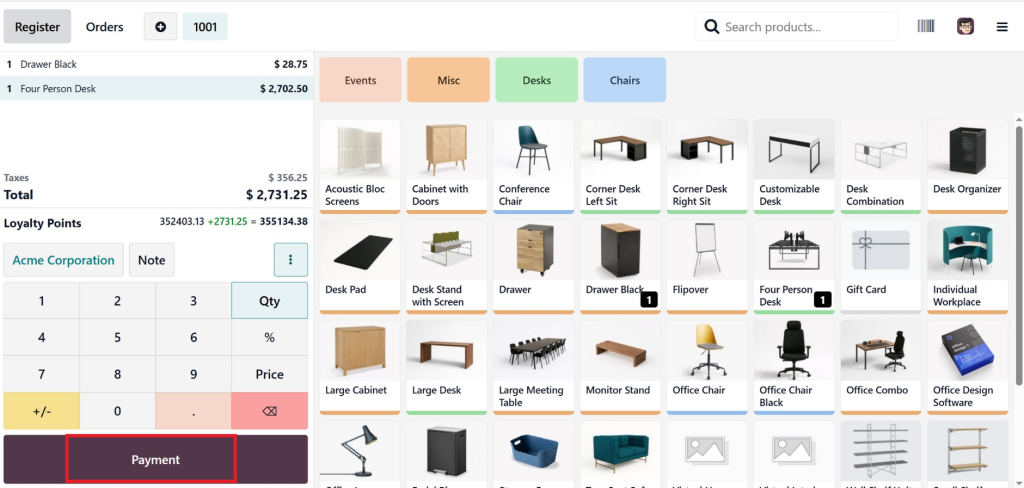
- Click Payment in the POS interface.
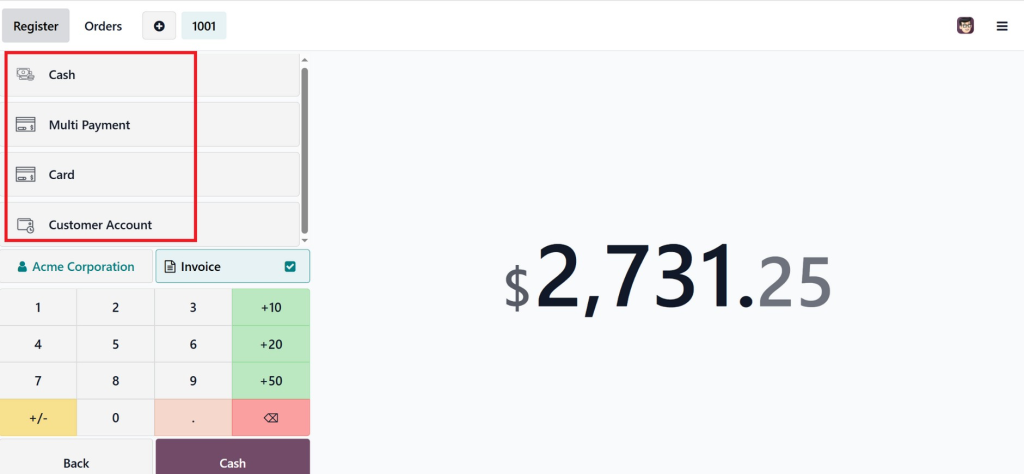
- Select the Payment Method – cash, card, or customer credit.
- Enter the partial amount the customer is paying now.
- Confirm the payment.
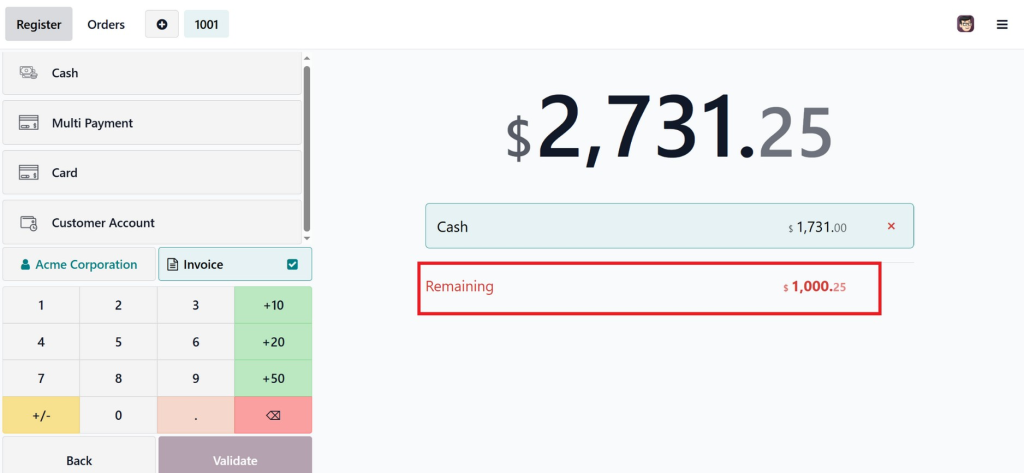
Odoo 19 POS allows you to split payments between cash and credit, so if a customer wants to pay partly in cash and partly by credit, the system handles it automatically.
Example:
A customer’s bill is $500. They pay $200 in cash now and apply $300 in account credit. The POS records payments and automatically updates the customer’s outstanding balance.
Step 4: Using Customer Credit for Partial Payments
Many customers prefer paying the remaining balance later using account credit. Here’s how partial payment in Odoo POS using customer credit works:
- The unpaid amount is stored in the customer’s account.
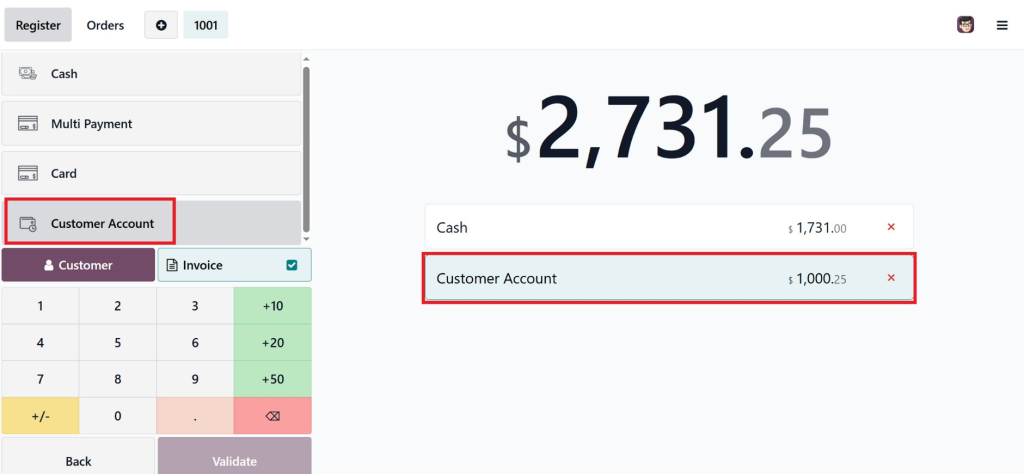
- POS generates reminders for due payments.
- Reports reflect both paid and outstanding amounts.
This approach simplifies handling partial payments in Odoo 19 POS, allowing businesses to maintain flexibility while ensuring accurate accounting.
Pro Tip: Encourage customers to pre-load their account credit for faster partial payments and smoother checkouts.
Step 5: Tracking Outstanding Balances
One of Odoo POS’s standout features is its real-time tracking of outstanding balances.
- Navigate to Customers → Accounts → Outstanding Balances.
- View a detailed list of customers, paid amounts, and pending balances.
- Use filters to sort by due dates, amounts, or payment status.
This helps businesses plan collections, forecast cash flow, and avoid missed payments. Tracking partial payments improves transparency and reduces disputes.
Step 6: Generating POS Reports for Partial Payments
Odoo 19 POS provides comprehensive reporting tools:
- Go to Point of Sale → Reporting → Orders.
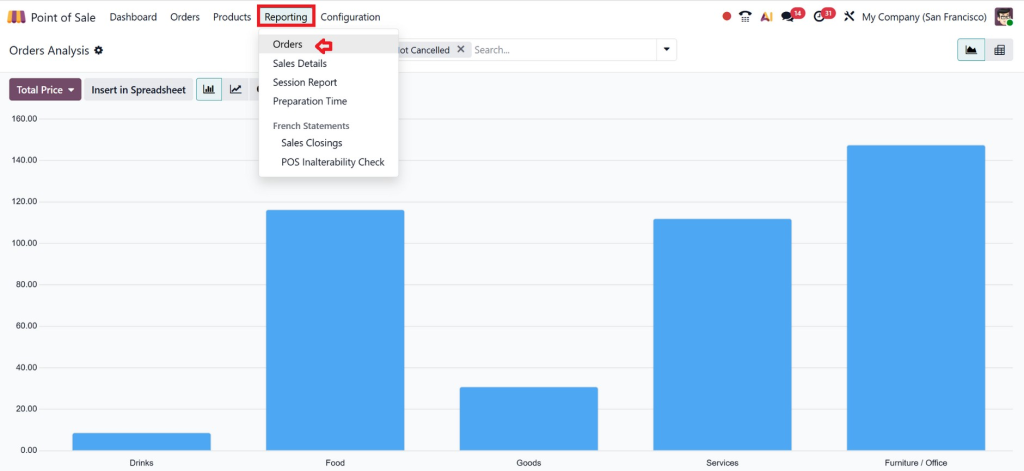
- Filter by Partial Payment.
- Review total collected, remaining balances, and customer-specific data.
These reports are essential for managers who want to handle partial payments in POS Odoo 19 efficiently, making accounting and follow-ups easier than ever.
Step 7: Best Practices for Managing Partial Payments
Get the most out of handling partial payments through Odoo 19 POS by following these tips:
- Every transaction ties back to a customer.
- Teach staff how to manage split payments, cash, and credit on Odoo 19 POS correctly.
- Occasionally, pull up the Odoo POS outstanding balance reports.
- Allow customers to pay partially using their credit balance.
- Clear updates go out when customers check their remaining funds.
- Stay current with POS setup by applying patches and new features as they become available.
What happens when these steps are followed? Operations run without hiccups. Mistakes shrink as customer confidence grows.
Real-World Use Cases
Use Case 1: Retail Store
A customer buys electronics worth $1,000. They pay $600 in cash and $400 later using customer credit. Odoo 19 POS tracks both payments, updates the customer account, and generates reminders for the remaining amount.
Use Case 2: Restaurant
A restaurant allows corporate clients to pay partially at the time of order and settle the rest weekly. In Odoo 19 POS, customer account payment ensures the remaining balance is automatically tracked.
Use Case 3: Wholesale Business
Wholesale clients often negotiate partial payments. With partial payments in Odoo POS using customer credit, wholesalers can efficiently manage large orders without risking cash-flow disruptions.
Benefits of Using Odoo 19 POS Partial Payments
Using Odoo 19 POS, partial payments have several advantages:
- Enhanced Customer Experience – Flexible payments attract more loyal customers.
- Increased Sales – Customers are more likely to purchase higher-value items.
- Time-Saving – Automated tracking reduces manual reconciliation.
- Real-Time Financial Insight – Reports give clear visibility into revenue and outstanding balances.
- Error-Free Accounting – Partial payments are recorded automatically.
By enabling these features, businesses can manage partial payments in Odoo 19 POS with ease.
Make Your Business Smarter with Partial Payments in Odoo 19 POS
When the clock hits zero, doing business well means more than pushing merchandise. Comforting customers matters. So does making things easy for them. Flexibility plays its part too. A seamless flow from start to finish helps too. This kind of result can occur when handling part payments in an Odoo 19 POS system, provided the process is handled thoughtfully.
People today prefer instalment payments. Cash might be tight now, and then there’s the wish to divide bills – flexibility fits. Can we enable it in Odoo 19 POS? That builds confidence, not risks profit. What builds loyalty? That would be trust. Shifting someone who only buys once into someone who keeps coming back – that happens through trust.
What makes Odoo 19 POS partial payments stand out is how clear everything remains. At any moment, you see exactly who owes what, along with pending amounts and arrival times of cash. Everything flows seamlessly, requiring no additional paperwork or manual tracking. A quiet helper, really – no noise, just results sitting behind your efforts as you build what matters.
Once you begin leveraging partial payments wisely, the POS becomes more than just fee paperwork. It starts driving real change across how your business grows, with sales increasing without forced pushes. Shoppers find reasons to trust the process. Money moves with less shock, more rhythm.
If you actually care about creating a business that feels modern to customers and prepares for what comes next, skip nothing. Start by getting comfortable with handling only part of a payment through Odoo 19’s POS system. Do it the right way, then see how everything just flows – easier, quieter, more like real service done right.




