


Introduction to Remove Old Accounting Entries in Odoo 19
Every system tells a story. In Odoo, your accounting data reflects every decision, every transaction, every step your business has taken. But over time, that story can become noisy. Old entries, test data, and unnecessary records begin to blur the clarity you once had. That is when the need to remove old accounting entries in Odoo 19 becomes not just important, but necessary.
Many professionals hesitate at this point. They ask a very valid question: “If I try to clean my accounting data, will I lose my sales or purchase records?” That hesitation is understandable. Because in Odoo, everything is connected.
If you are trying to remove old accounting entries in Odoo 19, you are not just cleaning data; you are protecting the integrity of your financial system. And if you are wondering how to delete old accounting entries in Odoo without breaking anything, you are asking the right question. This guide is written for that exact moment. The moment when you want clarity without risk.
Why You Should Not Directly Delete Journal Entry in Odoo 19?
It is tempting to go straight to the delete button. But in Odoo, every action has a consequence. When you attempt to delete a journal entry in Odoo 19 directly, the system resists, and it does so for a reason.
Journal entries are not isolated records. They are tied to invoices, payments, taxes, and reports. Removing them without a structured approach can lead to inconsistencies that are difficult to trace later. This is not a limitation. It is a safeguard.
When your system prevents you from deleting an entry, it is protecting the accuracy of your financial history. And that is something you should never compromise.
Understanding Odoo 19 Secure Entries and Their Purpose
Odoo introduces the concept of Odoo 19 secure entries to maintain discipline in accounting. Once an entry is posted, it becomes part of your financial truth. It cannot be casually edited or removed.
This design ensures:
- Your records remain reliable
- Your reports stay consistent
- Your audit trail is intact
If you are unable to modify an entry, it is not because the system is rigid. It is because the system is responsible. Understanding this changes your approach. You stop forcing deletion, and you start following a process.
Reset Journal Entry to Draft Odoo 19 As the First Step
If there is one action you should always remember, it is this: before you delete, you reset. To reset a journal entry to draft in Odoo 19 is to reopen the record for review. It gives you control without compromising structure.
The process is simple:
- Open the journal entry
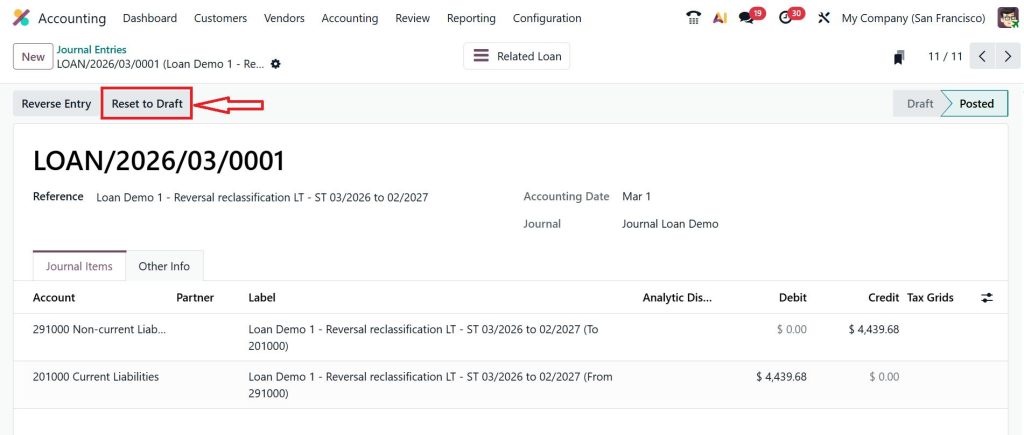
- Select “Reset to Draft”
- Review the entry carefully
Once the entry is in draft mode, you are no longer restricted. You can edit it, correct it, or remove it entirely. This step is not just technical. It is intentional. It forces you to pause, to review, and to act with clarity.
How to Delete Old Accounting Entries Odoo Without Breaking Your Data?
Now comes the question that brought you here, which is how to delete old accounting entries in Odoo in a safe and structured way. The answer lies in discipline.
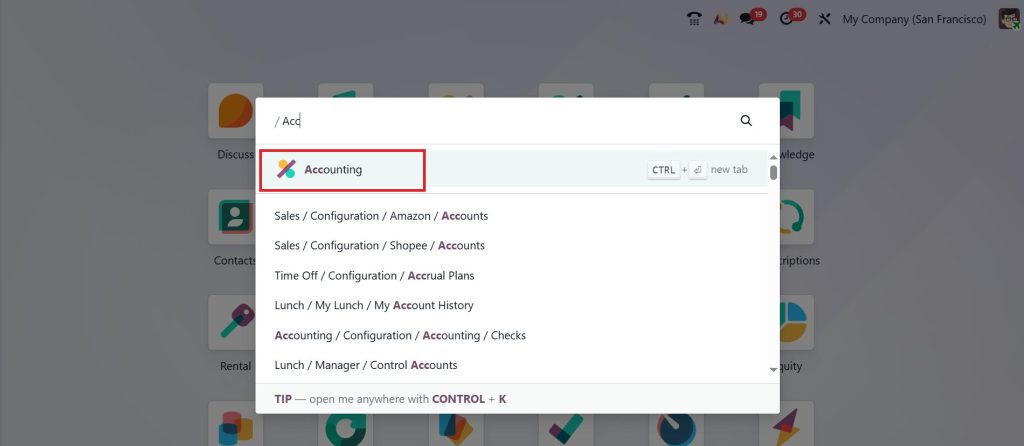
Open the Accounting app.
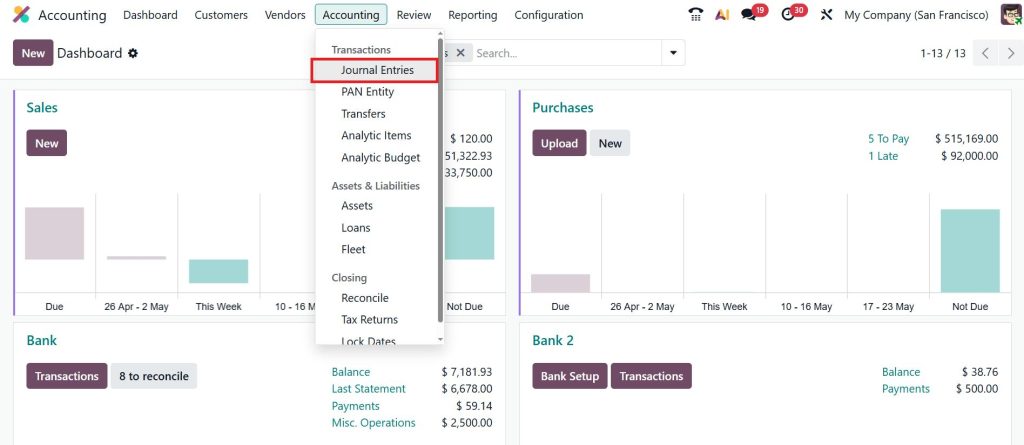
Go to Accounting → Journal Entries.
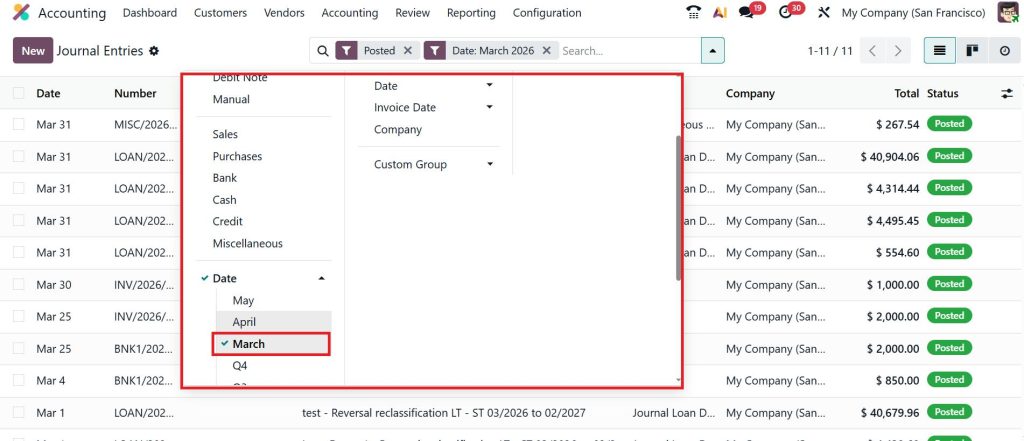
Next, start by identifying the entries you no longer need. Use filters by date, month, reference, or journal. Narrow your focus. Do not attempt to clean everything at once.
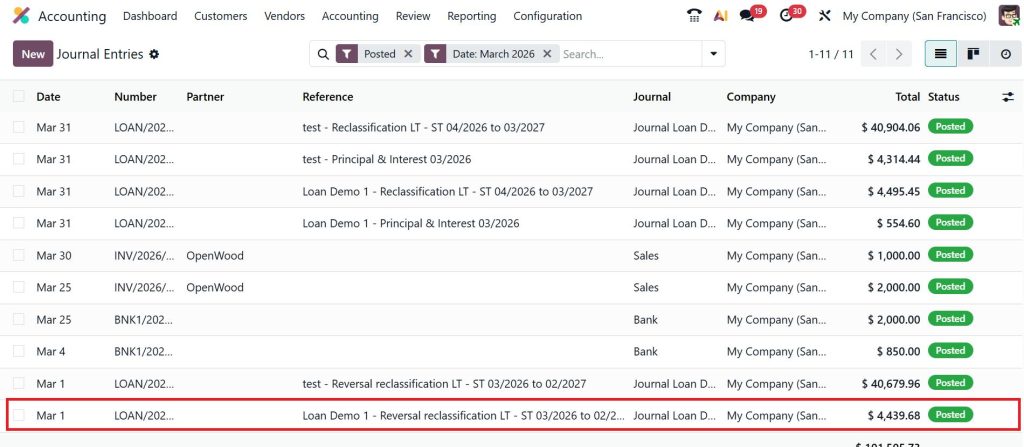
Select and open the entry.
Click Reset to Draft.
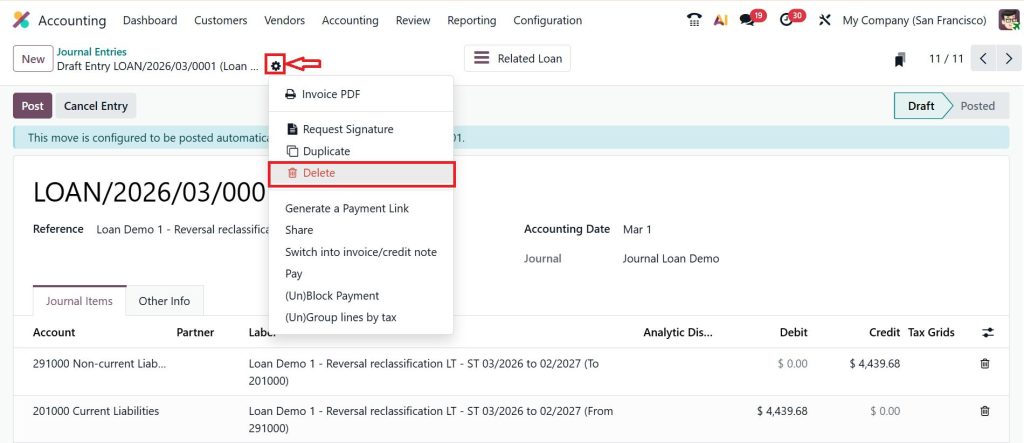
Click the gear icon (⛭) and select Delete.
Important Note:
- You must have proper access rights
- The entry should not be in the locked period
This approach ensures that when you remove old accounting entries in Odoo 19, you are doing so with awareness, not assumption.
Remove Test Transactions in Odoo to Clean Your System Faster
In many cases, the clutter does not come from real business activity. It comes from testing. During implementation or training, teams often create dummy invoices, payments, and journal entries. These remain in the system long after they have served their purpose.
Removing test transactions in Odoo is one of the quickest ways to restore clarity. Identify these entries. They often follow patterns with similar names, references, or dates. Reset them to draft, review them, and remove them. This is not just a cleanup. It is refined.
Clear Accounting Entries Without Deleting Sales Orders Safely
Here is the concern that stops most people from taking action: “What if I lose my sales data?” The truth is, you can clear accounting entries without deleting sales orders if you understand the relationship between them.
Sales orders generate invoices. Invoices create journal entries. If you attempt to delete the journal entry directly, you disrupt that chain.
Instead:
- Open the invoice
- Cancel it if necessary
- Reset the related journal entry
- Then remove the entry
This way, your sales order remains intact, while your accounting data is cleaned. It is not about removing data. It is about managing it correctly.
Odoo 19 Accounting Cleanup as An Ongoing Practice
Cleaning your data once is helpful. Maintaining it regularly is essential. Odoo 19 accounting cleanup should not be treated as a one-time task. It should become part of your routine.
Review your entries periodically. Remove what is unnecessary. Correct what is inaccurate. Keep your system aligned with your current reality. When your data is clean, your reports speak clearly. And when your reports are clear, your decisions improve.
Odoo 19 Chart of Accounts Cleanup for Better Structure
Sometimes, the issue is not just entries; it is structure. An overloaded chart of accounts can make even clean data difficult to understand. That is why Odoo 19 chart of accounts cleanup matters.
Archive accounts you no longer use. Merge duplicates. Simplify your structure. A clean chart of accounts creates a foundation where every entry has meaning, and every report has clarity.
When You Should Avoid Deleting Accounting Entries
There are moments when deletion is not the right decision. If an entry is part of a closed financial year, linked to tax filings, or already audited, it should remain untouched.
In such cases, consider reversing the entry instead. This maintains your history while correcting your position. Knowing when not to act is just as important as knowing when to act.
Common Mistakes in Deleting Journal Entry in Odoo 19 Process
Many users face issues not because the system is complex, but because the process is misunderstood.
Common mistakes include:
- Attempting to delete posted entries directly
- Ignoring linked invoices or payments
- Skipping the reset step
- Cleaning data without a backup
Each of these creates more problems than it solves. The right approach is slower, but it is safer.
Bringing Clarity Back to Your Odoo 19 Accounting
A clean accounting system is not about removing everything that looks old. It is about keeping what matters and removing what no longer serves your business. When you remove old accounting entries in Odoo 19, you are creating space for accuracy, focus, and a better understanding of your financial position.
You start noticing the difference in your reports. Numbers make more sense. Errors become easier to spot. Decisions feel more confident because the data in front of you is clear and reliable. This is not just cleanup; it is control over your financial environment.
Want to clean your Odoo 19 accounting without risking your data?
Connect with Netilligence and get expert support to manage your accounting the right way.




