

Why You Should Organize Events in Odoo 18 Calendar
We live in a world where missed meetings can cost opportunities, poor planning can delay entire projects, and one forgotten event can confuse your whole team. If you’re tired of hopping between WhatsApp groups, email threads, and sticky notes to remember your next team meeting, you’re about to step into a whole new world of event management. Say hello to the one tool that can bring peace to your scheduling chaos: The Odoo 18 Calendar. More specifically, let’s dive into how to organize events in Odoo 18 like a time-slaying superhero.
This is not just a calendar app. It’s a full-on command center for your business where events sync, reminders fly, teams align, and everything… works. From the first click to the final recurring event, this blog will walk you through everything you need to know to plan events in the Odoo 18 Calendar that don’t just sit there; they perform.
Let’s roll up our sleeves and change your empty calendar grid into a beautifully choreographed schedule of success, using every possible trick the Odoo 18 event organization Calendar has up its sleeve.
Odoo 18 Calendar Events Planning Untied
What if your Calendar could talk to your CRM? Could it notify your team, automatically send reminders, track participation, and sync every department’s rhythm? That’s precisely what Odoo 18 calendar events planning does. It doesn’t just put boxes on dates; it puts your entire business timeline in motion.
With a few clicks, you can create an event, attach it to a lead, schedule a Zoom call, notify the team, and even generate follow-up tasks, all from a single pop-up window. It’s so smooth you might feel like you’re cheating the system.
And that’s just the beginning. Whether you’re in HR scheduling interviews, sales setting demos, or operations planning weekly reviews, the Odoo 18 Calendar is your silent assistant who never sleeps, never forgets and constantly reminds you at just the right time.
Plan Events in Odoo 18 Calendar
A Few Clicks to Absolute Control
Let’s break the myth immediately: planning events doesn’t have to be boring. In fact, in Odoo 18, it’s almost fun. You click on a date and start typing. That’s how simple it is to plan events in Odoo 18 Calendar. You’re greeted with an elegant form that lets you name your event, pick the time, choose attendees, and (here’s the cool part) link it directly to anything in your Odoo system: contacts, deals, tasks, jobs, even accounting entries.
Think about it: you’re not just putting something on a calendar but starting a chain reaction across your digital ecosystem. One calendar entry could trigger an automated email, update a CRM opportunity, and remind five people without you lifting another finger.
Plan smarter. Plan faster. Plan once and let Odoo do the rest.
Odoo 18 Event Organization Calendar
The Future of Meetings Is Visual
Have you ever opened a calendar and felt more confused than clear? Yeah, we’ve all been there. That’s why the Odoo 18 event organization Calendar brings visual clarity to your busy schedule.
Toggle between Day, Week, Month, or List view. Color-code events based on type. See who’s attending. Spot clashes before they happen. It’s like Google Calendar earned a business logic and workflow automation degree.
Want to know what your CEO is up to next Wednesday? Just check their calendar permissions. Need to schedule a cross-departmental meeting? Instantly see who’s free. With Odoo 18, organizing isn’t just efficient; it’s enjoyable.
Odoo Calendar Module Event Setup
The Basic Setup with Zero Setup Headaches
Now, let’s talk setup, but without the stress. The Odoo Calendar module event setup proves that innovative tools don’t have to be complicated. As you create an event, you can add:
- Title and Description
- Attendees (internal or external)
- Event Type (call, meeting, deadline, etc.)
- Linked Records (tasks, leads, documents)
- Location (physical or virtual)
- Reminders and Notifications
Want to know the best part? You can even set conditions for automation. For example: “If this event is marked completed, assign a follow-up task.” You’re not just organizing; you’re building a mini workflow without writing a single line of code.
That’s the beauty of the Odoo Calendar module event setup: maximum results with minimum clicks.
Schedule Events in Odoo 18 Calendar That Practically Run Themselves
Here’s a little secret: most meetings aren’t missed because people don’t care. They’re missed because people forget. However, forgetting is no longer an option when you schedule events in the Odoo 18 Calendar. Odoo is like a personal assistant who taps you on the shoulder 10 minutes before every appointment with an agenda, location, and attendee list in hand.
And yes, it can do more than nudge. You can schedule recurring events, sync with email notifications, and automatically mark who attended and who didn’t. Everything is tracked. Everything is remembered.
Need to reschedule? Drag and drop. Need to add a teammate? One-click. Need to clone an entire week of events? Done in seconds.
Odoo doesn’t just help you schedule events in the Odoo 18 Calendar; it makes those events run more smoothly than ever.
Odoo 18 Calendar Recurring Events
Because Repetition Shouldn’t Be Repetitive
Suppose, every Monday, you have a team huddle. Every first Thursday, a client strategy calls. Every 15th, a financial review. Typing those out every single time? That’s a big nope.
With Odoo 18 calendar recurring events, you create it once, and it lives forever.
You decide the pattern:
- Daily
- Weekly
- Monthly
- Yearly
- Custom crazy pattern (yes, even that)
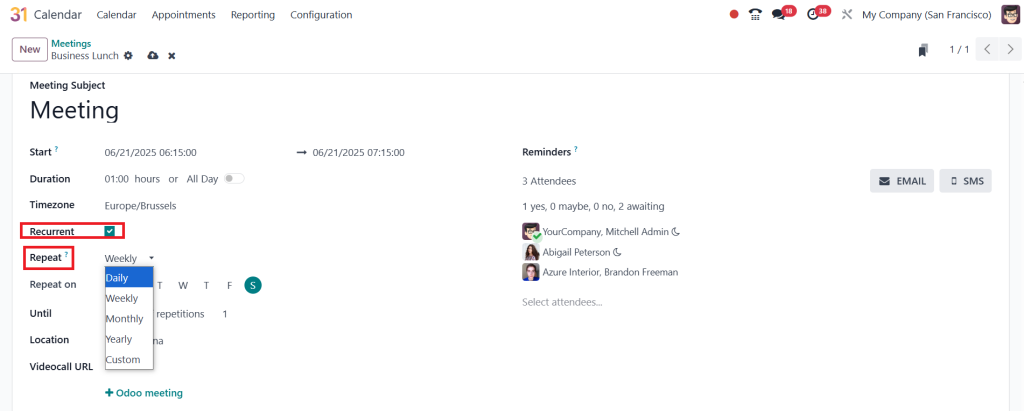
And Odoo handles the rest. No more missed reviews. No more “Oh, was that today?” moments. Recurring events save time, build consistency, and create a tempo your team can rely on.
Let’s be honest: some events aren’t just meetings. They’re rituals. And Odoo respects that.
How to Create an Event in Odoo 18 Calendar Without Breaking a Sweat?
Here is the million-dollar question: How do you create an event on the Odoo 18 Calendar?
Spoiler alert: It’s so easy and almost like magic.
Step 1: Open the Calendar
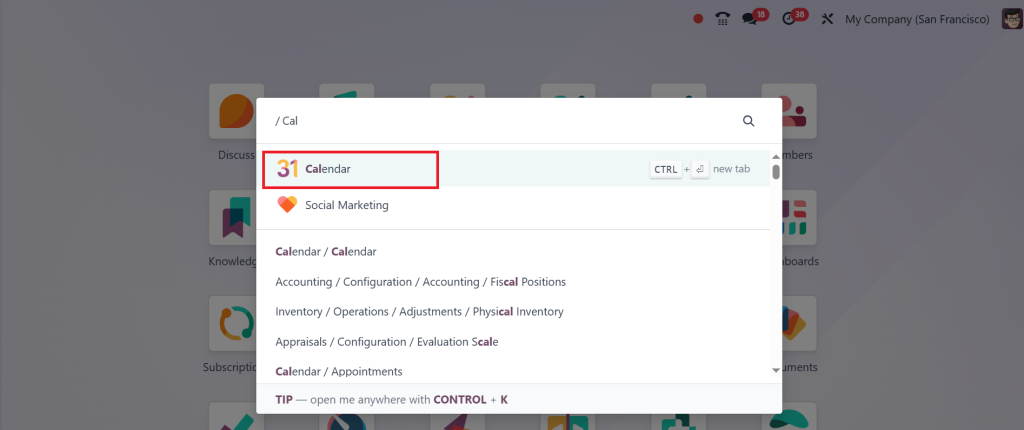
Step 2: Click any date/time
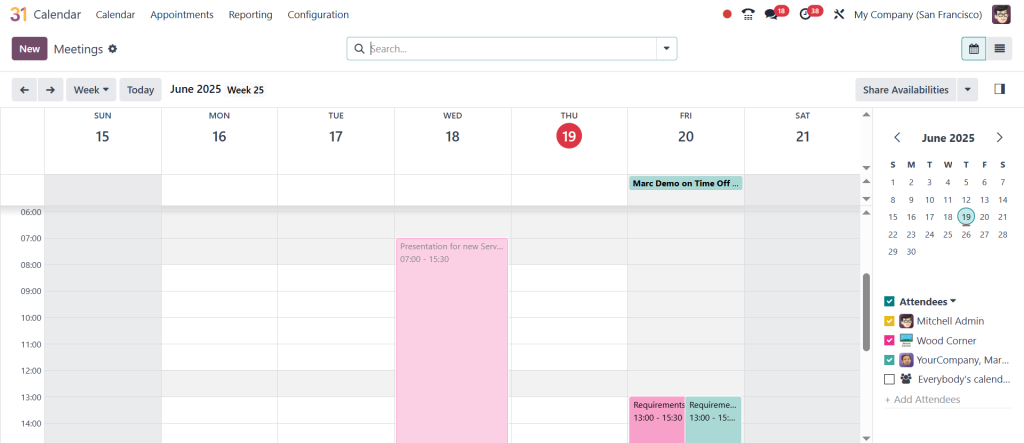
Step 3: Click ‘‘More Options’’.
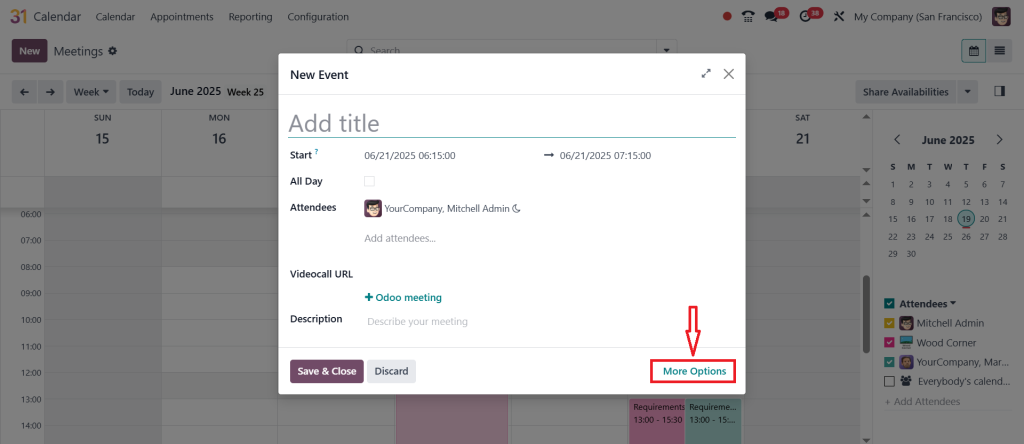
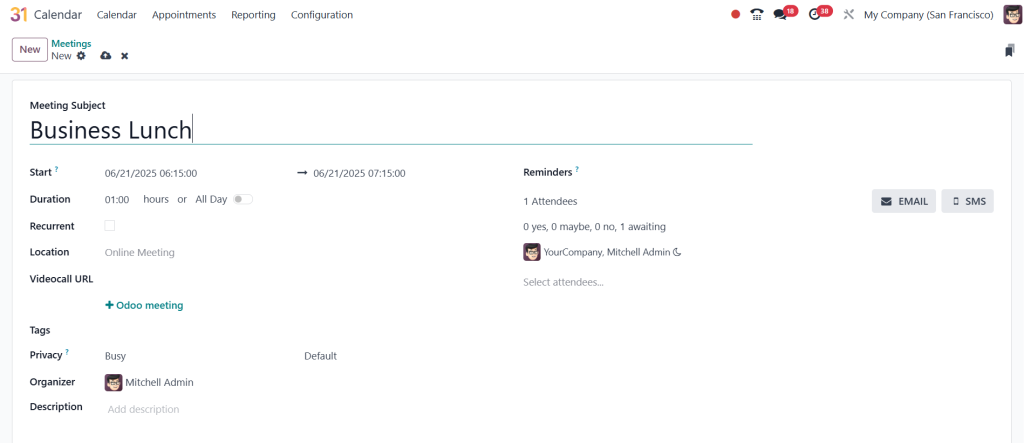
Step 4: Fill in the blanks title, time, attendees, location & recurrent.
Step 5: Hit “Save”
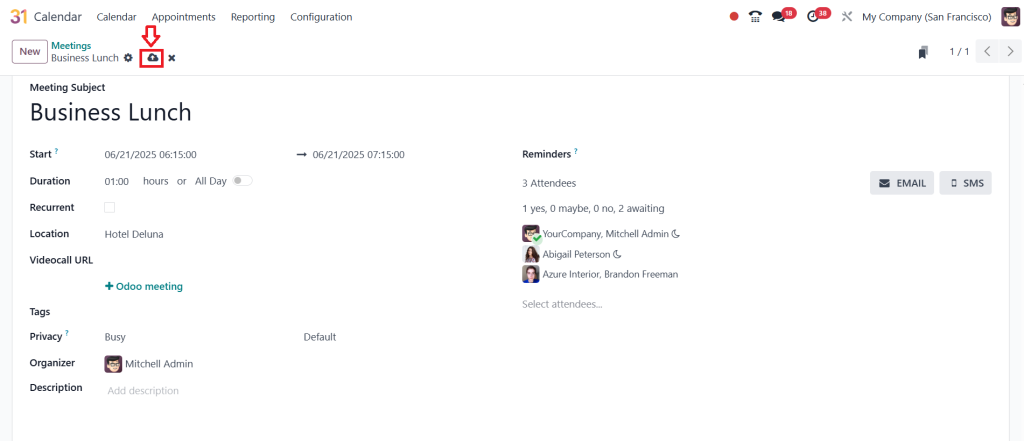
Done. Your event is live, synced, notified, and logged. It took 10 seconds, and you’re already onto the next task. This process doesn’t just save time; it makes planning addictive. You’ll find yourself scheduling excitedly because you know Odoo has your back.
This isn’t just how to create an event. It’s how to win your day before it even begins.
Why You'll Never Look at Event Planning the Same Again
Once you begin to organize events in Odoo 18, you realize you’ve been settling for less all along. This isn’t a simple date-stamping tool. It’s a deeply connected, highly responsive event management system that changes your thoughts about time.
Forget the days of juggling tools, forgetting calls, and scrambling for meeting links. Odoo takes all of it and bundles it into one sleek interface that thinks before you do.
The Odoo 18 calendar events planning process isn’t just technical; it’s transformational. Whether managing a team of five or coordinating across countries, Odoo helps you run the show with confidence, structure, and style.
And the best part? You’ll never ask, “What did I miss?” again.
Own Your Time & Rule Your Calendar
We all get the same 24 hours. The difference lies in how we use them. With Odoo 18 Calendar, you’re not just using time but investing it. You’re structuring your day with intention, clarity, and collaboration.
From one-time meetings to Odoo 18 calendar recurring events, from startup scrums to corporate conferences, from interview scheduling to global launches, if it belongs on a calendar, it belongs in Odoo.
So go ahead. Start exploring. Create events. Automate processes. Bring teams together. And most importantly, organize events in Odoo 18, as your business depends on it.
Because it does.
Ready to take control of your Calendar like never before? Start planning smarter today with Odoo 18, and if you need help setting it up, Netilligence is here to guide you every step of the way.
Contact us now, and let’s make your scheduling smooth, efficient, and ready for the future.




