How to Manage Group Payments in Odoo 18 Accounting?
Group Payments in Odoo 18 Accounting
Managing payments efficiently is critical to a company’s financial health. Whether dealing with multiple vendors or collecting bulk payments from customers, handling transactions one at a time can be time-consuming and error-prone. That’s where Group-Payments in Odoo 18 Accounting come in, allowing you to simplify your processes and completely control your accounts.
Odoo 18 introduces robust tools for group-payments, also called Odoo 18 batch payments. These features enable finance teams to manage large volumes of payments more efficiently, reduce manual entry, and automate reconciliations. Whether you’re managing Odoo 18 customer payments or Odoo 18 vendor payments, the group-payment feature ensures accuracy, speed, and clarity.
This guide explains how to manage Group-Payments in Odoo 18 Accounting, highlights key features, and shares practical implementation steps so you can make the most of your Odoo accounting system.
What are Group Payments in Odoo 18 Accounting?
Group Payments in Odoo 18 Accounting allow you to combine multiple payment entries into a single transaction. That is especially useful when paying various invoices to a single vendor or recording bulk customer payments.
Why use Group Payments?
Simplify payment tracking
Speed up reconciliation
Minimize transaction fees
Improve cash flow visibility
For example, instead of creating separate payments for each invoice, Odoo allows you to create Odoo 18 batch payments, grouping them under a single payment record for smoother processing.
Setting Up Group Payments in Odoo 18 Accounting
Before diving into group-payment operations, you must enable payment management settings.
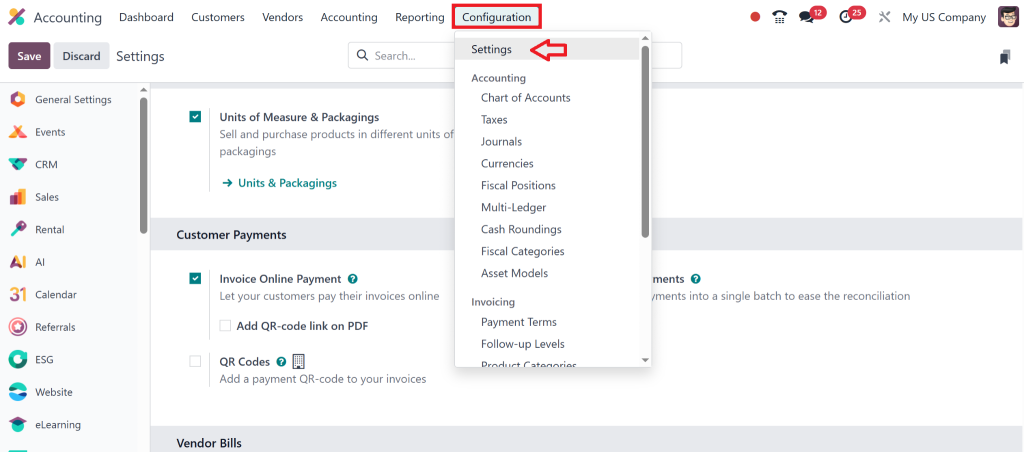
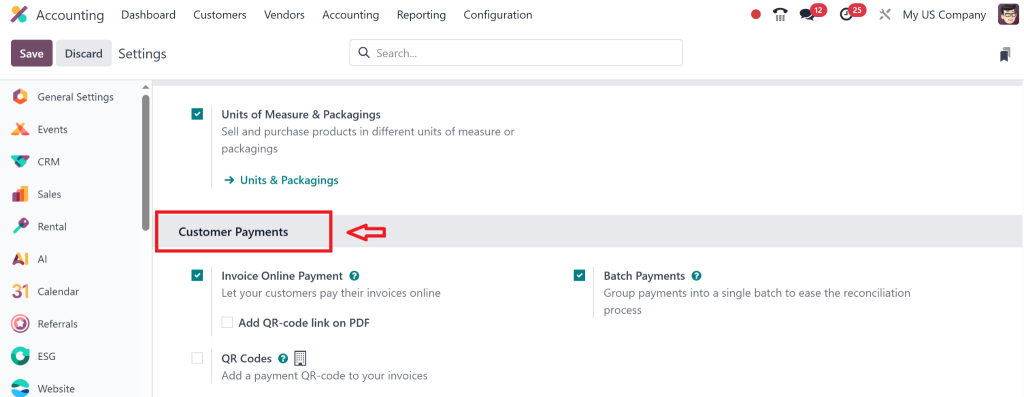
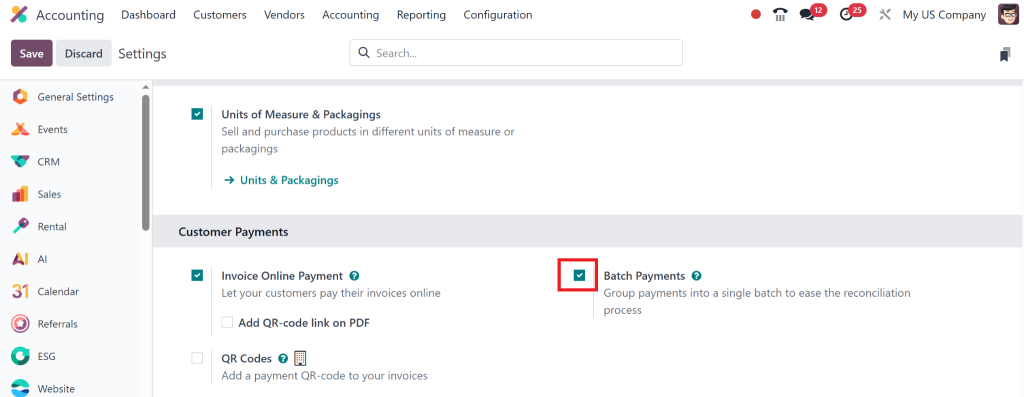
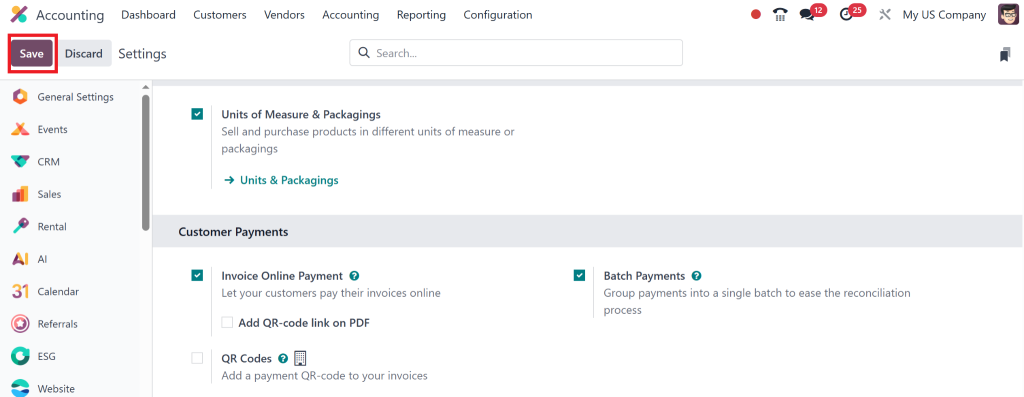
Step 1: Enable Batch Payments
Go to Accounting > Configuration > Settings
Scroll down to Vendor Payments or Customer Payments
Enable the checkbox for Batch Payments
Click Save
Step 2: Configure Bank Journals
Ensure your bank journals are correctly set up to allow batch processing:
Navigate to Accounting > Configuration > Journals
Select your bank journal
Enable the “Batch Payments” option under the journal configuration
Step 3: Payment Methods
Make sure Manual, SEPA, or other supported payment methods are added to the journal.
These methods are necessary for actual fund transfers when executing Odoo 18 accounting payments
Creating Group Payments for Vendors in Odoo 18
Managing Odoo 18 vendor payments becomes a breeze with batch processing.
Step-by-Step:
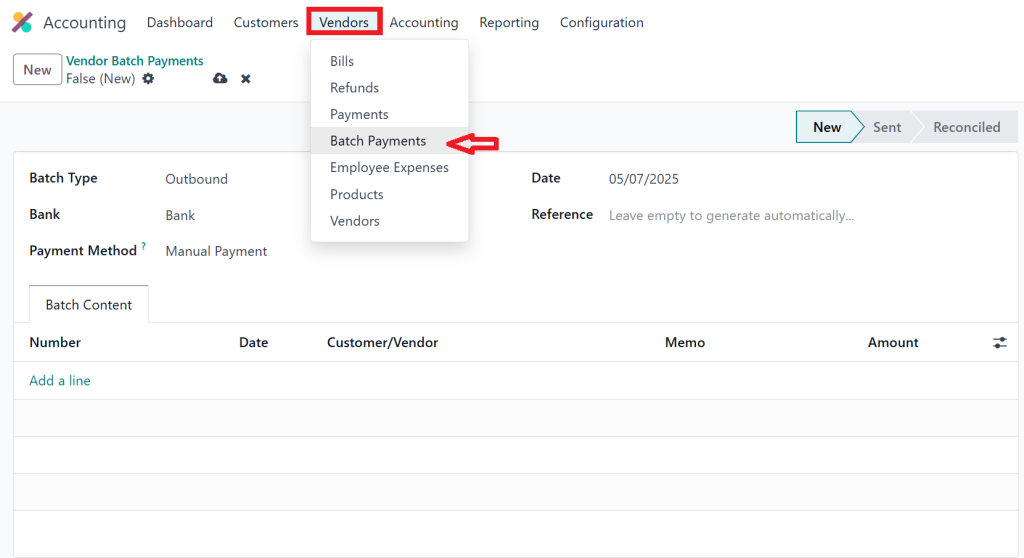
Go to Accounting > Vendors > Batch Payments
Click on Create
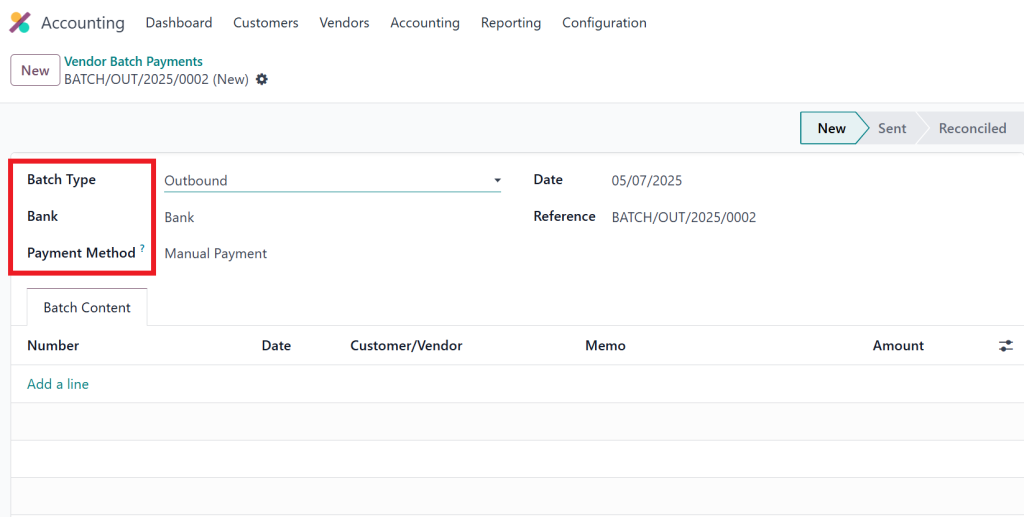
Select Payment Type (e.g., Send Money)
Choose Bank Journal and Payment Method
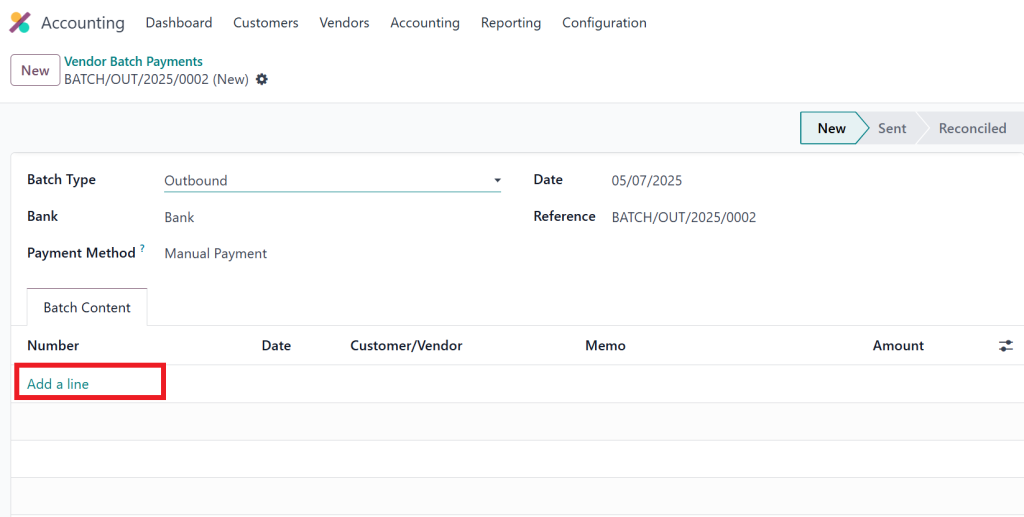
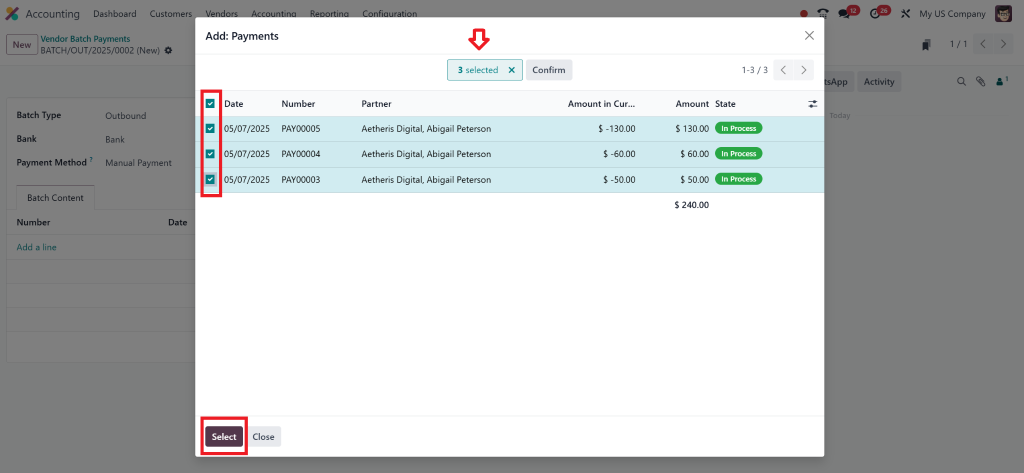
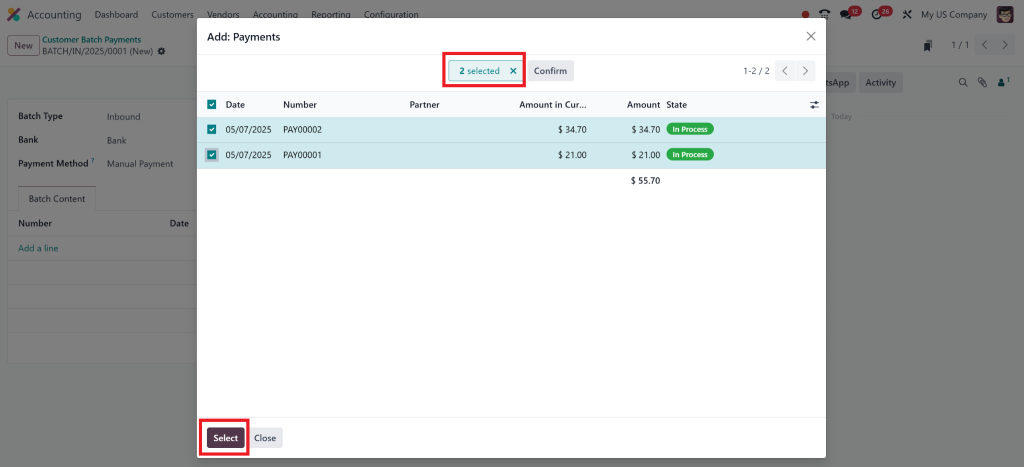
Add payment lines by clicking Add a Line.
and selecting unpaid vendor bills
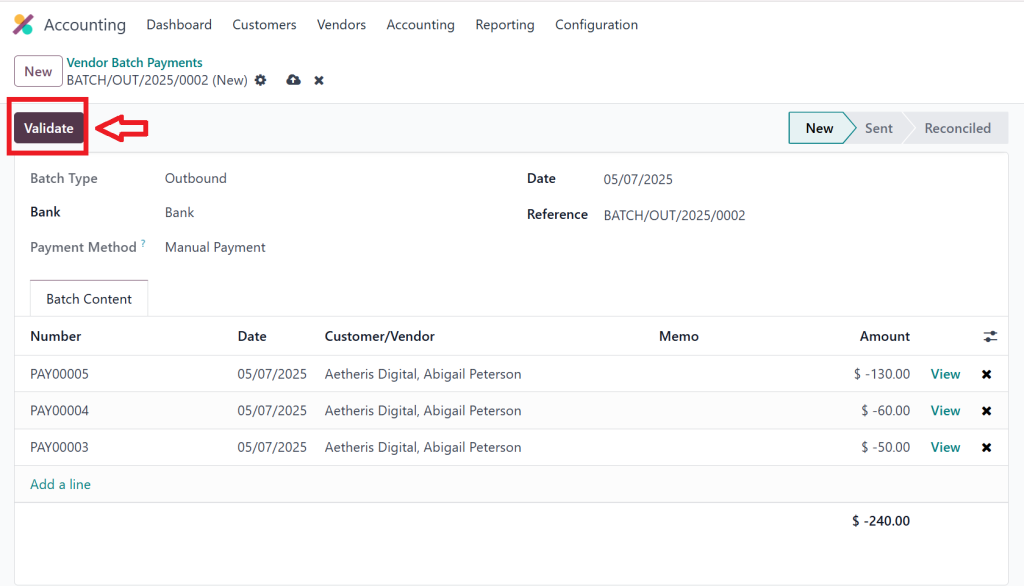
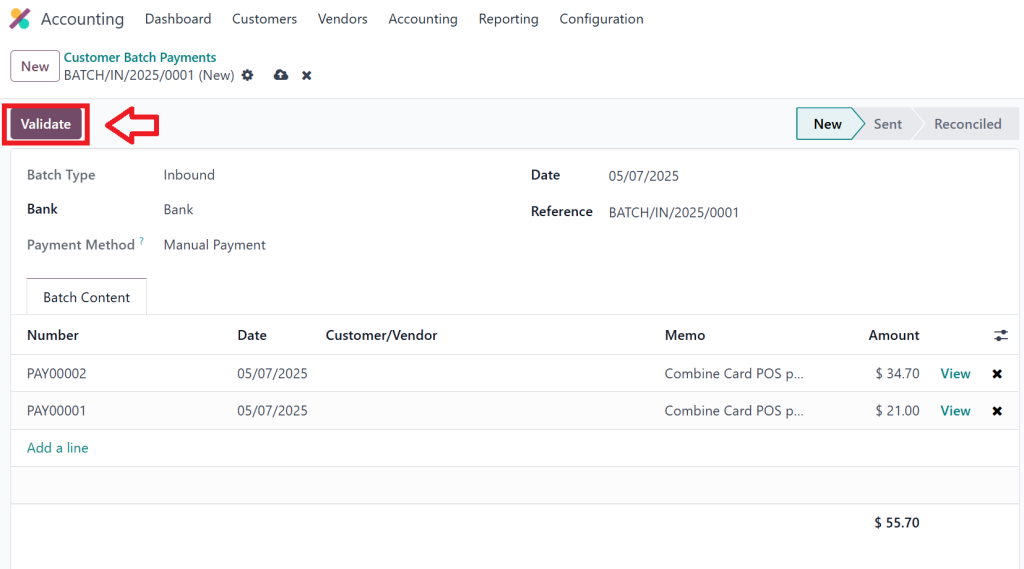
Click Validate to process the group payment.
Once the batch payment is validated, a single payment entry is created for the selected invoices, and the payment reconciliation can be done quickly.
Tip:
You can also schedule Odoo 18 group-payments ahead of time to match with supplier payment terms.
Receiving Group Payments from Customers
For companies dealing with bulk receipts, Odoo 18 customer payments via group receipts help consolidate multiple invoices into one receipt.
Step-by-Step:
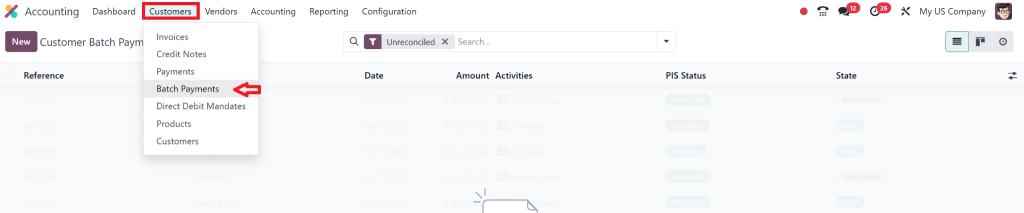
Go to Accounting > Customers > Batch Payments
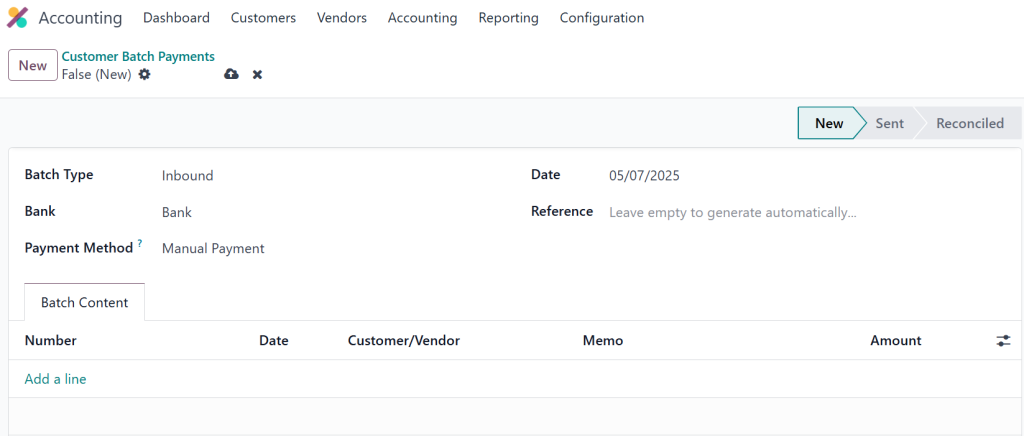
Select Receive Money as Payment Type
Choose the correct customer and payment journal.
Select multiple invoices and validate the group receipt
This single payment will now cover all selected invoices. Odoo automatically applies the payment to the corresponding invoices, reducing reconciliation time.
Reconciliation of Group Payments in Odoo 18 Accounting
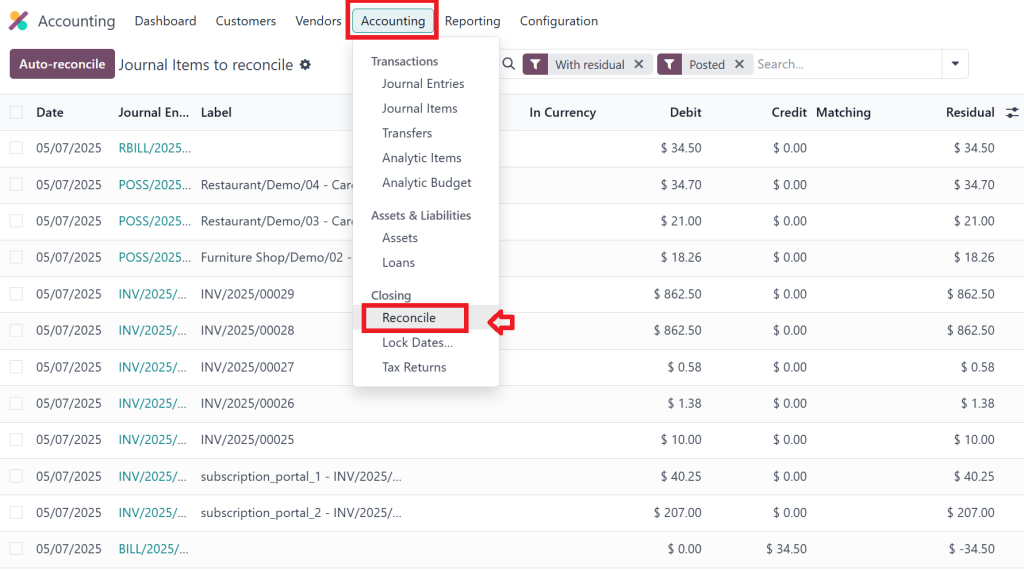
Once a batch payment is processed, the next step is to match it with bank statements through Odoo 18 payment reconciliation.
How to Reconcile:
Navigate to Accounting > Reconcile
Import your bank statement or create one manually
Match the group payment with the bank entry using Odoo’s smart reconciliation tool
Odoo accounting group payment reconciliation is smooth because the system automatically detects grouped entries. It intelligently matches the amounts and references across multiple invoices.
Best Practices for Managing Group Payments
To make the most out of Group-Payments in Odoo 18 Accounting, consider the following practices:
1. Regular Review of Outstanding Invoices
Ensure all open invoices are current and included in group payments without error.
2. Use Bank Integration
Set up direct bank feeds in Odoo to simplify Odoo 18 accounting payments and real-time reconciliations.
3. Schedule Payments Based on Due Dates
Set batch payments to align with vendor terms, reducing late fees and improving relationships.
4. Segment Payments by Vendor or Project
Use tags or analytic accounts to track payment batches by project, location, or team for enhanced visibility.
5. Audit Trails and Reports
Always review Odoo 18 group-payments history through journal entries and batch reports to ensure accuracy and compliance.
Benefits of Using Group Payments in Odoo 18 Accounting
Time Efficiency
Batching payments significantly reduces the time spent on manual entry.
Accuracy in Records
Thanks to centralized group entries and validations, there is less room for error.
Enhanced Cash Flow Visibility
Real-time tracking of payables and receivables through consolidated views.
Automated Reconciliation
Fewer manual steps thanks to Odoo’s intelligent reconciliation feature.
Vendor/Customer Satisfaction
Better payment handling improves trust and partnerships with stakeholders.
Everyday Use Cases for Group Payments in Odoo 18
Paying multiple bills to a supplier on a fixed date
Receiving monthly membership or subscription fees from customers
Managing payroll transactions in bulk
Paying for bulk purchases across different departments
All these use cases are smoothly handled within Odoo 18 group-payments, reducing hassle and increasing productivity for finance teams.
Make Every Payment Count with Odoo 18
If your team is still entering payments one at a time, it’s time to upgrade. Group-Payments in Odoo 18 Accounting are designed for modern finance operations that value speed, accuracy, and strategic insight.
From simplifying bulk payments to enhancing reconciliation, Odoo 18’s features help you regain cash flow control. Whether managing Odoo 18 customer payments or coordinating large Odoo 18 vendor payments, the batch processing capabilities will change how you work.
Netilligence can help you implement, customize, and train your team to fully utilize Odoo 18’s group-payment tools, bringing efficiency and clarity to your accounting operations.
Ready to facilitate your payment process?
Contact Netilligence today, and let’s simplify your finance operations with Odoo 18 batch payments.
Hi, I'm Nabia, an Odoo ERP functional & technical content writer. I specialize in blogs, social media content, ad copy, landing pages, service pages, and email campaigns.
We use cookies to ensure that we give you the best experience on our website. If you continue to use this site we will assume that you are happy with it.